Don’t miss this great deal on Nexlink Computer Systems for Greenville / Upstate Businesses

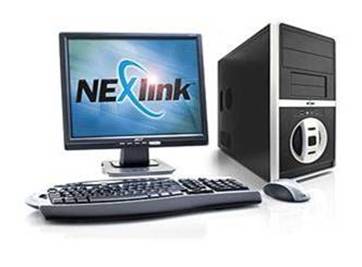
Nexlink Express Business Computer

Time to replace some computers at your company? We have a great deal for you on a high quality business computer for only $599.oo through December 30th.

Please do not confuse these with consumer grade computers available at office supply stores and big box stores. Nexlink Express 1000 computers are designed with business in mind. Featuring Genuine Microsoft Windows 7 Professional, Intel motherboard, Intel processor and a 1 year warranty. We can upgrade the warranty to a 3 year warranty if required for a few extra dollars.

Seneca Data manufacturers these computers right here in the USA, and should support be required, you speak with technicians who are also here in the USA!

  • Intel Dual-Core E5700 @ 3.0 Ghz
  • Intel D41WV Mainboard
  • 2 GB DDR3 1333 Mhz RAM
  • 22x SATA DVD-RW
  • 250 GB 7200RPM SATA-II
  • 80 Plus 350 Watt Power Supply
  • Genuine Microsoft Windows 7 Professional
  • Nexlink USB Keyboard, USB Optical Mouse
  • 1 Year Depot Warranty (3 year warranty is available)
  • Energy Star 5.0 Compliant

$599.oo

Add Microsoft Office 2010 Home and Business for only $149.oo!

If you would like more information about this special, or have any questions related to business computers, please call 864.990.4748 or email info@homelandsecureit.com.

Sorry, but this special is only valid in Greenville and the Upstate of SC and expires December 30th.

1

Nexlink 4000SP notebook computer only 599.oo for a limited time

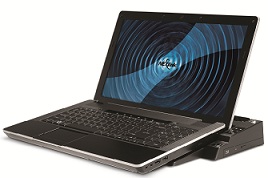
Looking for a quality notebook at an affordable price? The Nexlink 4000SP series notebook which I have written about before is available in a model more suited to the home or mobile business user at a great price of only 599.oo.

4000SP Notebook from Nexlink

4000SP Notebook from Nexlink

This version features a 15.6″ LCD display, Intel Pentium P6100 2.0 Ghz 3MB processor, 2GB of RAM, 160GB HD, 802.11 a/b/g/n wireless network, and Microsoft Windows 7 Home Premium. It also has a 1 year warranty which covers the LCD and AC Port (1 instance).

Why would you buy the Nexlink product over brand X? The quality is outstanding, the customer support, should you need it, from the AMERICAN manufacturer is unparalleled (you actually speak to someone in the USA, who speaks English as their primary language!), and the customer satisfaction has been much higher than with many other brands!

A docking station is a suggested option which allows you to connect a keyboard, mouse, larger LCD display, etc to the docking station, and drop your notebook into that station when at home, and then grab just the notebook and slip that into your travel bag without plugging and unplugging lots of accessories.

If you would like more information about this 4000SP designed with the home or mobile business user in mind, or one decked out specifically for your business use with an Intel i7 processor and Microsoft Windows 7 Professional  for instance, please call us at 864.990.4748 or email info@homelandsecureit.com.

This offer is available for a limited time, and quantities are limited. We cannot ship this item out of the Greenville / Upstate SC area.

Homeland Secure IT Christmas Holiday Hours

Merry Christmas

Our office will be closed on Christmas Eve so we can spend time with our families, however, if you have an emergency and require computer service or repair, do not hesitate to email or call! Messages left on our voice mail system will automatically forward to us within seconds in email…

Everyone here at Homeland Secure IT would like to wish you a very Merry Christmas, and a Happy New Year!

Thank you for entrusting your Greenville / Upstate business to us in 2010, we look forward to 2011!

Greenville computer repair and virus removal service special #Greenville

Our Gift To You - Affordable Service

Our Gift To You - Affordable Service

Computer running slow? It could have a virus…. WE CAN HELP!

Bring your workstation or notebook to our office at 104 Mauldin Rd, STE E in Greenville where we will give you super-fast service and not charge you an arm and a leg!

Our typical virus removal / cleanup takes about an hour and our current rate is $75/hr in our office. This covers Microsoft Windows, Apple Mac OS X and even *nix. We don’t just “wipe and reload”, causing you to lose your settings and require you to reload all your applications. We strive to clean the computer first, removing the malicious software and insuring you safe and secure.

We also offer complete computer, server & network service, repair, support and sales to businesses and individuals in the Upstate. We will go to your location in Greenville, Anderson, Simpsonville, Spartanburg, Taylors, Duncan, Greer, Easley, Clemson, Pickens, etc, but this special is for service performed in our Greenville office only.

Call 864.990.4748 or email info@homelandsecureit.com for more information about this ongoing special.

Merry Christmas & Happy New Year!

Is your smartphone spying on you? #android #iphone

Ever download an app for your phone and see all the access you are giving the thing?  You wonder why a certain app would need access to your camera or your location, but you go ahead and install it anyway because you want the latest version of the program.

I’ve done it myself, installed some game, which states clearly that it will have access to totally unrelated areas of the phone, like the camera, or the GPS.

Well, an article in the Wall Street Journal the other day highlights how the information gathered by these apps is being used. It appears that this behavior is more rampant on the iPhone than on Androids, but the study is not as indepth as it could be for sure.

All I have to say is, whether you are using an Android or an iPhone, be careful out there. You don’t want your phone watching your every move…

Slow internet access? Charter Business ups the ante in Greenville / Upstate SC

Speedometer

This sure isn't DSL!

Tired of waiting for that ISO to download? I know the feeling, even with the 30megabit download speeds we currently have…

As if they were reading our minds regarding speed limitations, our Charter Business rep let us know the other day that they have turned it up a notch here in Greenville and are offering two new speed packages.

The “Pro40” package is 40 megabit down and 4 megabit up… YIKES!  40m x 4m is incredible! 4 megabit up is nearly twice what we have now and an extra 10 megabit down will make those big ISOs arrive a bit quicker. Oh but that’s nothing at all. Seriously.

There’s a “Pro75” package, yeah, and you already guessed it: 75 megabit down and 5 megabit up. Holy #&!% this is amazing!!!!!!!   All I want for Christmas is 75×5.

While it is not Google Fiber, it is available right now, without a huge outlay of cash. In fact, the 75×5 is less than the cost of a 1.5m up/down T1.

This type of bandwidth is necessary if you are contemplating a move towards cloud computing, and the uplink speeds will allow you to better serve remote users!

If you would like more information about Charter Business services and how it can help your business, please give us or your Charter Business rep a call. Our free network support evaluation will tell you if your current firewall, router, switch, etc may be a bottleneck in your new high-speed network infrastructure.  We are also your Upstate experts on cutovers from one internet service provider to another. Call us today – 864.990.4748 or email info@homelandsecureit.com

Virus cleanup and removal tops the list of typical computer repair and service in Greenville, SC

As 2010 draws to a close, I have been looking back over the service that Homeland Secure IT has performed and talking with other computer service techs about the work that has come through our doors and not at all surprising is the fact that malware / virus removal & cleanup was one of the most common types of issues tackled.

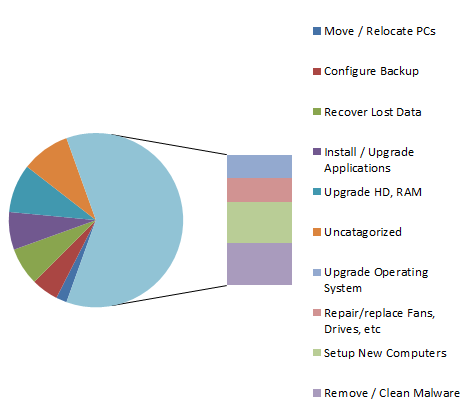
Not at all an exhaustive study in this, but here’s what the typical notebook and laptop (end user) PC repair and maintenance looks like:

Computer RepairsA full 20% of our end user (business and home computer and notebook) service has comprised of something related to malware, viruses, trojans, worms, spyware, rootkits, etc… Whether it was cleaning a machine which was infected, or installing anti-virus to help protect it, a lot of time (and client money!) was invested into this area.

The only other area of computer service that came close was the setup and deployment of new desktop workstations, notebooks, laptops, etc.

What does that tell us? It tells us too many people are running inadequate anti-virus and anti-malware, on unpatched computers.

We can’t remember any of these infections occuring on Microsoft Windows 7 machines, and not a single client with Windows 7 running Trend Micro Worry Free Business Security or Titanium! The majority of them were running Windows XP.

I guess that means if everyone with XP would switch over to a Windows 7 based machine with Trend Micro Anti-Virus, we would lose some revenue, but I think we can live with that! One thing is for sure: Mac and Linux owners better start keeping their systems up to date and get some anti-virus loaded, as they have already overtaken the latest versions of Windows as far as the rate of infections are going!

If you feel your computer may be compromised (signs are strange behaviors, unexpected windows opening, getting a strange website instead of a familiar one, machine running slower than normal, blue screens, lockups, reboots, etc), please give us a call at 864.990.4748 or email info@homelandsecureit.com. We provide complete computer repair, service and support in the Greenville / Upstate SC area.

SECURE IT ALERT: Microsoft “Patch Tuesday” brings security updates for Windows, Explorer, Office, Sharepoint & Exchange

Secure IT Alert Header

Homeland Secure IT Alert

Homeland Secure IT Alert for Wednesday, December 15, 2010

Many of you may have found your Microsoft Windows computers rebooted when you came into work today if Automatic Updates is configured. But there are more updates than Automatic Updates will address. This Tuesday brought security updates to the following:
  • Microsoft Windows Operating System (XP, 2003 Server, Vista, Win 7, 2008 Server, 2008 R2)
  • Microsoft Internet Explorer  (IE 6, 7 & 8 get 7 holes plugged)
  • Microsoft Office (current versions and Work 9)
  • Microsoft Sharepoint Server 2007
  • Microsoft Exchange Server 2007

As you can see, these updates apply to all current versions of the Windows Operating System, current versions of IE, current versions of Office and all current Microsoft Windows Server, Sharepoint Server and Exchange.

The severity of the vulnerabilities range from important to critical, with enough critical and urgent updates to give you cause for concern. An unpatched system could fall victim to hackers easily, allowing complete control to be gained by remote users.

You should insure all updates have been applied to your Windows Operating Systems, Office, IE immediately. Server owners should take steps to update at their earliest convenience.

If you would like more information about how to install these updates, how to deploy automatic patch management into your network, etc, please do not hesitate to call us at 864.990.4748 or email info@homelandsecureit.com. We offer computer, server & network service, support and repair in Greenville and the Upstate of SC.

Homeland Secure IT Alert Footer

Homeland Secure IT Alert

Secure IT Alert: December Firefox Update Fixes 13 Critical Vulnerabilities (Mac, Windows & Linux)

Secure IT Alert Header

Homeland Secure IT Alert

Homeland Secure IT Alert for Tuesday, December 14, 2010

In an effort to keep the Firefox browser secure, updates have been released that address multiple vulnerabilities. If you are using the 3.5.x or 3.6.x versions of the popular browser on Microsoft Windows, Linux or Apple Mac, you should insure your browser is up to date immediately to 3.5.16 or 3.6.13 respectively.

Failure to do so could allow an attacker to execute code on your computer, regardless of the operating system.

I have attached the announcement from the WatchGuard security ML below:

December Firefox Update Corrects a Bunch of Critical Vulnerabilities

Severity: Medium

13 December, 2010

Summary:

  • These vulnerabilities affect: Firefox 3.6.x and 3.5.x for Windows, Linux, and Macintosh
  • How an attacker exploits it: Typically by enticing one of your users to visit a malicious web page
  • Impact: Various results; in the worst case, an attacker executes code on your user’s computer, gaining complete control of it
  • What to do: Upgrade to Firefox 3.6.13 (or 3.5.16), or let Firefox’s automatic update do it for you

Exposure:

Last week, Mozilla released a Firefox update fixing 13 (count based on CVE number) vulnerabilities in their popular multi-platform web browser. Mozilla rates most of these vulnerabilities as critical; meaning an attacker can leverage them to execute code and install software without user interaction beyond normal browsing. We summarize three of the most critical Firefox 3.6.12 vulnerabilities below:

  • Integer Overflow Vulnerability in Javascript Array (2010-81).  A javascript array (specifically NewIdArray) in Firefox suffers from an integer overflow vulnerability that can cause a memory buffer overflow. By enticing one of your users to a maliciously crafted web page, an attacker can leverage this buffer overflow to either crash Firefox, or to execute malicious code on that user’s machine, with that user’s privileges. If the user happened to be a local administrator or had root privileges, the attacker would gain total control of the victim’s computer.
    Mozilla Impact rating: Critical
  • Document.write() Buffer Overflow Vulnerability (2010-75). According to Mozilla, one of the javascript methods used to write text to a page (document.write) suffers from a buffer overflow vulnerability.  By enticing one of your users to a web page containing specially crafted javascript, an attacker can leverage this buffer overflow to either crash Firefox, or to execute malicious code on that user’s machine, with that user’s privileges. As usual, an attacker may gain full control of your users’ computers if they have administrative privileges.
    Mozilla Impact rating: Critical
  • Three Memory Corruption Vulnerabilities (2010-74). Mozilla’s update fixes three unspecified memory “safety” related vulnerabilities, which can at least crash Firefox. Mozilla’s alert doesn’t say much about these vulnerabilities, other than they lie within Firefox’s browser engine. Mozilla presumes that, with enough effort, attackers could exploit some of these memory corruption flaws to run arbitrary code on a victim’s computer. To do so, an attacker would first have to trick one of your users into visiting a maliciously crafted web page. If your user took the bait, the attacker could execute malicious code on that user’s machine, with that user’s privileges. If the user happened to be a local administrator or had root privileges, the attacker would gain total control of the victim’s computer.
    Mozilla Impact rating: Critical

Mozilla’s alert describes many more critical vulnerabilities, most of which allow attackers to execute code simply by enticing you to a malicious web page. Visit Mozilla’s Known Vulnerabilities page for a complete list of the vulnerabilities that Firefox 3.6.13 fixes. On a related note, some of these vulnerabilities also affect Firefox 3.5.x. If you use 3.5.x, we recommend you move to 3.6.13. However, if you must stay with 3.5.x, Mozilla has also released an update for that legacy version as well.

Solution Path:

Mozilla has released Firefox 3.6.13 and 3.5.16, to correct these security vulnerabilities. If you use Firefox in your network, we recommend that you download and deploy version 3.6.13 as soon as possible. If, for some reason, you must remain with Firefox 3.5.x, make sure to upgrade to 3.5.16.

Note: The latest version of Firefox 3.6.x automatically informs you when a Firefox update is available. We highly recommend you keep this feature enabled so that Firefox receives its updates as soon as Mozilla releases them. To verify that you have Firefox configured to automatically check for updates, click Tools => Options => Advanced tab => Update tab. Make sure that “Firefox” is checked under “Automatically check for updates.” In this menu, you can configure Firefox to always download and install any update, or if you prefer, only to inform the user that an update exists.

As an aside, attackers cannot leverage many of these vulnerabilities without JavaScript. Disabling JavaScript by default is a good way to prevent many web-based vulnerabilities. If you use Firefox, we recommend you also install the NoScript extension, which will disable JavaScript (and other active scripts) by default.

For All Users:

This attack arrives as normal-looking HTTP traffic, which you must allow through your firewall if your network users need to access the World Wide Web. Therefore, the patches above are your best solution.

Status:

The Mozilla Foundation has released Firefox 3.6.13 to fix these vulnerabilities.

References:

This alert was researched and written by Corey Nachreiner, CISSP.


What did you think of this alert? Let us know at your.opinion.matters@watchguard.com.

More alerts and articles: log into the LiveSecurity Archive.

WatchGuard manufactures a wide range of network security appliances / firewalls that can help protect your business from malicious attacks, reduce spam, keep  you within compliance and give you peace of mind. We offer the full WatchGuard line of products for sale and provide support. For more information, email info@homelandsecureit.com or call 864.990.4748.

If you would like a free consultation, please contact us today!

Homeland Secure IT Alert Footer

Homeland Secure IT Alert

Password security is a necessary inconvenience these days due to various sites being hacked…

It sure has been an event filled weekend regarding security! Several high profile sites have been hacked…  The largest is the Gawker controlled sites, Gawker, Gizmodo, Lifehacker and a slew of others where it is estimated that as many as 1.5 million usernames and passwords may have been compromised.

Supposedly, the Gawker passwords also allowed Facebook to be used for spamming acai berry ads from compromised accounts.

Two other major sites, McDonalds and Walgreens, fell victim to hackers over the weekend too.

It should be plain to see that anyone using the same login and password on multiple sites is the most vulnerable. Therefore, it is recommended that you use a different password on every site you use, so in the event of one site becoming the target of hackers, at least your password will not be used to log into other sites, such as banking, or even medical.

Some of you are already complaining, I can hear you all the way over here at my office and I feel your pain! When you are subscribed to a dozen blogs, do your banking online, use services like eBay, or social media sites like Facebook, Twitter, etc, you would have to have, and more importantly REMEMBER dozens of accounts and passwords.

Fortunately, there are password management tools that can help you. There are free apps that accomplish this for your Android, Blackberry or iPhone, and many more for your Windows or Mac based computer. These apps will even create random passwords for you so you don’ t have to come up with a password each time you create a new account.

Just what IS a secure password? I’m glad you asked! A secure, or “strong” password should be at least 8 characters long, contain Upper/lower case characters, a number or more, and special characters such as “%”, “@” or “&”. It should not include any part of your login name, or any information such as your name, or birthdate. The best password would contain no actual words, but appear something like this:  xTgRaQ3@l1)

Think your password is secure? Check it out HERE

If you feel your computer or password may have been compromised, please seek assistance from your computer security support specialist who can help assess the extent of the damage. We provide a full line of computer repair, service, support and security, as well as free consultation in Greenville and Upstate SC…  Call 864.990.4748 or email info@homelandsecureit.com for additional information…