Apple’s Mac OS X Lion poses enterprise security risks (this is not a repeat)…

Using Mac’s in your enterprise?

You will want to read this article http://www.theregister.co.uk/2011/08/26/mac_osx_lion_security_hole/

This is kind of a big deal, as it underscores that Mac OS X Lion machines simply fail at LDAP, a basic part of enterprise network integration.

In short, if you bring these Macs into your environment, once authenticated, they simply don’t care which password is entered, they simply say “yer in!”…

Those of you who believe Macs are super secure need to rethink that philosophy and accept that there are problems with all OSes that pose a threat.  About a week ago, I posted about a threat that involves a pure Mac server network, without any Microsoft involvement, just as bad as this current LDAP issue, no, actually worse.

If you would like to discuss integration of Macs into your Greenville / Upstate, SC Microsoft Windows environment, please give us a call at 864.990.4748 or email info@homelandsecureit.com…

Don’t trust those external portable USB hard drives with your important data!

I’ve posted this before…  External, portable, USB hard drives are convenient to store some data on, but dang it, don’t put everything on one and trust that it is forever and always going to be there for you.

These devices use 2.5″ hard drives like you would find in a notebook computer, and while there is nothing wrong with those drives, they do tend to be a little more fragile and have a shorter life-span than their 3.5″ brethren.

Case in point….  Today, I was going to copy some data from my daughter’s old computer to an external usb drive…   While the data made it over there, it was the straw that broke the camel’s back and other things started happening. The huge collection of music that resided on the drive became unstable. It was taking long periods of time to open the files, some were damaged and thousands were missing.

Running recovery software only resulted in finding parts of files, because when I started copying my daughter’s files to that drive, they overwrote sectors where parts of the other files had been…    There’s no recovering that.

Thankfully, I had a backup, but what if I did not?

The moral of this story is – backup, backup, backup…   Use something like an online cloud backup system or multiple hardware devices, and do it often.   DO NOT put all your eggs in one basket and trust some >100 dollar usb drive. Doesn’t matter if you are using a Microsoft Windows PC, Mac OS X, Linux, or an Commodore 64, back it up!

Should you need help determining which backup solution is right for you or your business, please give us a call at 864.990.4748 or email info@homelandsecureit.com. We are one of Greenville / Upstate South Carolina’s premier computer & server backup specialists and we have a disk, tape, cloud or NAS solution to suit your application!

Microsoft Windows Vista EOL (End Of Life) Announcement – No, it’s not dead quite yet!

Coming this October 22nd, is the official death of Microsoft Windows Vista…  At least from the perspective of anyone wanting to buy it from a Microsoft dealer.

Us dealers have been told that we can sell Vista until our stock is depleted. Which brings up one questions?  WHO has stocks of Windows Vista?

Seriously though, this is just the standard life cycle of Microsoft products.  Here’s the rundown:

Windows Vista was released January 30th, 2007, and October 22nd, 2011 is the “End Of Sales” for retail packages.  That data also marks the end of sales for PCs with Windows preinstalled.

Sooo, if you are dying to have Windows Vista, you better rush out and get it now!    Other people may be wanting to dance on Windows Vista’s grave.

Trend Micro Titanium 2012 anti-virus / anti-malware now available

Trend Micro Titanium 2012

Trend Micro Titanium 2012

Trend Micro has unveiled their Titanium update for 2012!

Keep your identity, data and social network protected from a new generation of threats. Staying safe online these days is about more than just avoiding malware. You have to protect your device, your privacy, your personal data, your social network, and your family against an army of new threats. Given that abandoning the Internet completely isn’t really an option, how do you accomplish all these goals at once? The new Trend Micro Titanium 2012 is packed with powerful new and enhanced features to help you protect the many aspects of your digital life-and can do it in a way that’s fast, simple, and easy to manage.

Nobody wants security software that hogs disk space, presents constant pop-ups and alerts, or that’s complicated to install—so Titanium 2012 provides automated security with a small footprint that anyone can use. Titanium 2012 offers the strong, fast security that gave Titanium its name—but this new version includes powerful features and enhancements to keep you protected from the next generation of threats:

• New social networking protection
• New easy to customize console
• New fake AV cleaner
• New proactive botnet protection
• New proactive PE virus protection
• New method to detect packer-encrypted malware
• Enhanced virus and spyware detection and cleaning
• Enhanced behavioral monitoring
• Enhanced rootkit detection and removal

The new Titanium 2012 is still powered by the Trend Micro™ Smart Protection Network™ infrastructure, our cloud security infrastructure that stops threats in cyberspace or “the cloud.” Smart Protection Network monitors the Internet 24/7, worldwide. It gathers and analyzes threat data, blocking viruses and other malware before they can reach your PC. And because processing is done in the cloud, Titanium 2012 uses less of your PC’s memory and disk space.

If you would like more information about Trend Micro’s Titanium 2012 Maximum Security product or any of the other Trend Micro products, from endpoint to server, from home to enterprise, please call us at 864.990.4748 or email info@homelandsecureit.com.

We specialize in providing Trend Micro licensing, sales, consultation, installation and support to Greenville / Upstate SC small, medium and enterprise business clients. We offer and recommend Trend Micro Worry-Free Business Security as the primary line of defense for small/medium businesses! From one computer to 1000!

Just “deleting” a file could land you in prison #datasecurity

Alrighty, that sounded bad… Deleting a file probably won’t land you in jail unless you are doing something illegal in the first place.

The idiot who attempted to extort money with a “collar bomb” was most likely caught due to leaving a message on a USB flash drive that he had deleted files from.

The ONLY safe way to remove data from a hard drive, flash drive, tape drive or other types of media is to physically destroy it. Our friend Brent over at ShredDisk can help you with that. Don’t make the mistake of deleting files only to find they are recoverable.

Here’s a link to the original article which mentions additional clues that were used to find the “collar bomber”, such as meta data in a recovered Microsoft Office Word document.


Football starts tonight…

Starting tonight, we will be sitting in a stadium watching our son play football for Easley High School.

That is all…

Why do you need power protection?

Everyone wants to save a dollar or two, so they buy the new computer, monitor and printer, and skimp on some of the other components.  One in particular is power protection.

By power protection, we mean surge protectors and uninterruptable power supplies (UPS) primarily.

The fact that a few dollars were saved on the front-end may end up costing big dollars in the long run.

Case in point: A friend and client recently had a lightning strike event at their home (again), and multiple devices were damaged. His brand new notebook computer was shipped off to the factory by the place he purchased it and was out of commission for two weeks. A high density USB hub was destroyed, as were several other components.

Had this fella purchased an inexpensive UPS, he could have possibly avoided the downtime, expense and frustration.

We are dealers for APC, Eaton and other companies that provide outstanding power protection products and highly recommend that individuals and businesses incorporate these units into their infrastructure.

Should you wish to discuss protecting your sensitive electronics, server rooms, computers, servers, networks or even your home electronics and avoid expensive computer repair or service or replacement, please call us at 864.990.4748 or email info@homelandsecureit.com

Your mailbox has NOT exceeded the storage limit as set by your administrator

One thing I am asked weekly is, “I just received an email alert telling me my mailbox exceeded the storage limit, why is that?”.

Wellllllll, first of all, these messages, though they come in email and look all official, signed by “System Administrator” or something similar, are likely phishing attempts.

If you hover over the URL listed to “re-validate” your mailbox, or to “increase your storage limit”, you will see that the link has nothing to do with your email host.

People who fall for this and follow the link through are presented with a form which asks for personal information to authenticate your account. That information is destined for parts unknown and could be used for anything from creating new accounts for you, to obtaining personal information about your finances, medical records, or who knows what. In most circumstances, it is going to be for monetary gain.

One I checked out for a client a few minutes ago prompted me to write this blog post…  It was a very authentic looking email that appeared to come from Google’s GMail service. Even the link looked right upon first glance even to me, and understandably to the person who received it. The web interface was in the style of Google’s and other than the VERY in-depth questions, would have passed for a Google page.  It was the supposed “Personal Profile Page”.

We’re talking about asking a person to input their first, last and middle name, street address, phone number, cell phone number, age, sex, birthdate, email address, which is fairly normal, but upon entering bogus information, it took me to a second page.  That one was for “Personal Identity Verification” purposes, “for your safety”. Heh…. It asked you to input security questions for help in identifying you in the future.   Mother’s maiden name, street you grew up on, enter a pin number, old Google password and a new one to change to for security purposes and something you should never be asked for, Drivers License number and expiration, SOCIAL SECURITY NUMBER and a CREDIT CARD number with expiration date “For account verification purposes only, no charge will appear”.

They had gone to the trouble of putting up a FAQ that was functional, and even a “Contact Us” link that gave you a webform to fill out with your information.

Bottom line here is – don’t believe everything you read, and certainly, don’t just enter your private information into sites just because it LOOK official……

If you have done this recently, you should contact your financial institutions immediately. Watch those credit card bills closely!

15

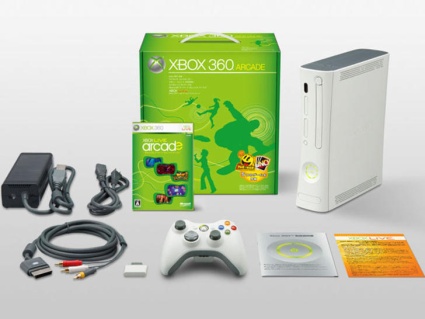
Homeland Secure IT is giving away an XBOX 360 Arcade system for no particular reason…

Homeland Secure IT is giving away an XBOX 360 Arcade

There's no such thing as a free lunch, but there IS a Free XBOX 360 from Homeland Secure IT available!

It has been too long since we gave something away! Well, that’s not entirely true… We “give away” excellent computer, server and network service, support and repair at amazingly low rates every day!

However, that is not what I am talking about. I’m talking about giving away an XBOX 360 Arcade system from Microsoft which will give you hours of enjoyment, or maybe act as a baby-sitter for your children, or possibly for your husband / boyfriend, etc…

I believe the retail value is about $200, but not being a gamer, I’m not entirely sure.  I received this as a prize from Microsoft and not that I don’t appreciate the beauty of the packaging it came in, or the fact that it functions well as a door stop, it’s just that there is someone out there who will use it and enjoy it, so here we go… Time to Give It Away! (The Red Hot Chili Peppers said so!)

How do you win it?

There is NO purchase necessary, but there are some things that you must do…

  • Pass through our initiation process – This is where you tattoo your forehead with the Homeland Secure IT logo. Okay, this is optional.
  • Sign up to this blog by hitting the SUBSCRIBE BUTTON over in the right-hand column. You can receive the daily blog posts in email first thing in the morning this way. And you can opt out later (after the contest is over) when you get tired of my yammering…
  • Sign up for our SUPER LOW traffic mailing lists HERE … We rarely send anything out, so you won’t be too annoyed. You can unsubscribe from either or both at anytime, AFTER the contest end date.
  • Go to our home page at www.HomelandSecureIT.com and hit the Google +1 button
  • Go to our Google business places page and leave a review and rating (hopefully a good one)
  • LIKE us on facebook HERE …     Follow us on Twitter HERE

For each one of those that you do, you increase your odds of winning considerably! The way the drawing will work is like this:

Every email / name on the blog and email subscription list will be combined into one long list. However many entries there are will be totaled and then I will use a random number generator like you might find at http://www.random.org/ will be used to pick a number and the person who appears on line number X from the list of combined subscribers will be selected. I will then contact them and see if they actually want it.

There are a few exclusions…  IF you are not from the Upstate area of SC and are unable to stop by our office and pick up the console, then you should not bother, as I don’t want to pay or take the time to ship it to you.

IF you attempt to cheat by subscribing from bogus accounts, I will likely know and unsubscribe you.

IF you are under the legal age, whatever that is, then you should not subscribe. (Let’s assume old enough to drive a car to get a prize, or the age that is legal in your world).

IF you are forbidden by law or some other oddity that keeps people on your planet from playing our silly game, then you should not subscribe.

I think that’s it….    Sign up, and good luck…

On September 1st, the anniversary of asking my wifey to marry me, I will “draw” for the winner!


Microsoft Office 2010 for students could be cheaper than you think

It’s that time of year again… School is starting up as I write this…

This means many people are buying notebook and desktop computers for their school-bound children and many are paying full retail price for Microsoft Office 2010.

It doesn’t have to be that way.  Microsoft has a special that lets students who purchase Microsoft Office 2010 Home & Student download Outlook, Publisher and Access free of charge, so basically, you get everything that is in the higher dollar version without the added expense.

But there are still other programs available. There is the Microsoft Academic Program that lets you purchase a steeply discounted version of Microsoft Office 2010 Academic, or Microsoft Windows 7.

Knowing about these opportunities can save you some big money, which is a blessing when sending your child off to college. (Our daughter Megan starts college in about a week! EEEP!).

If you would like more information, please call us at 864.990.4748 or email info@homelandsecureit.com – We have computer and software sales & specials for Greenville & Upstate SC students all the time, but Microsoft’s current special for free downloads are avilable only through September 25th, 2011.