2

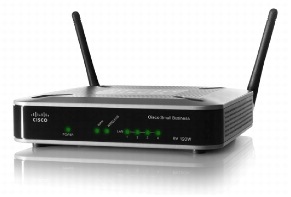
Cisco introduces the RV110W Wireless-N VPN Firewall

Take Basic Connectivity to a New Level

The Cisco® RV 120W Wireless-N VPN Firewall combines highly secure connectivity – to the Internet as well as from other locations and remote workers – with a high-speed, 802.11n wireless access point, a 4-port switch, an intuitive, browser-based device manager, and support for the Cisco FindIT Network Discovery Utility, all at a very affordable price. Its combination of high performance, business-class features and top-quality user experience takes basic connectivity to a new level.

 Cisco RV 120W Wireless-N VPN Firewall

Product Overview

The Cisco RV 120W Wireless-N VPN Firewall features:

• High-speed, standards-based 802.11n wireless connectivity to help employees stay productive while away from their desks

• Integrated 4-port 10/100 switch with quality of service (QoS) support for enhanced voice, video and data traffic

• Support for separate “virtual” networks enables you to control access to sensitive information and to set up highly secure wireless guest access

• IP Security (IPsec) VPN support with hardware acceleration to deliver highly secure, high-performance connections to multiple locations and traveling employees

• Support for static routing, Routing Information Protocol (RIP) versions 1 and 2, and inter-VLAN routing to enable flexible connection sharing

• Proven stateful packet inspection (SPI) firewall, plus advanced wireless security to help keep business assets safe

• Simplified configuration through an intuitive, browser-based device manager

• Support for the Cisco FindIT Network Discovery Utility

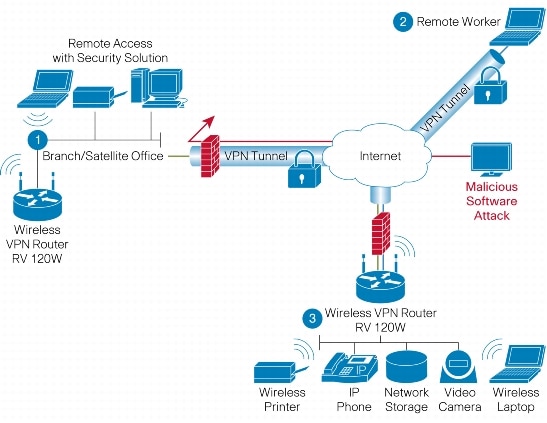
Figure 2 shows back panel of the Cisco RV 120W. Figure 3 shows a typical configuration using the firewall.

Figure 2. Back Panel of the Cisco RV 120W

Figure 3. Typical Configuration

Product Specifications

Table 1 gives the product specifications for the Cisco RV 120W.

Table 1. Product Specifications

Feature Description
Routing  

• Static routing

• RIP v1 and v2

• Inter-VLAN routing
Layer 2  

• 802.1q -based VLANs

• 4 active VLANs (1 to 4094 range)
Network  

• Dynamic Host Configuration Protocol (DHCP) server, DHCP relay agent

• Point-to-Point Protocol over Ethernet (PPPoE), Point-to-Point Tunneling Protocol (PPTP), Layer 2 Tunneling Protocol (L2TP)

• DNS Proxy

• IGMP Proxy and multicast forwarding

• Dynamic Domain Name System (DynDNS, TZO)

• Network Address Translation (NAT), Port Address Translation (PAT), Network Address Port Translation (NAPT), Session Initiation Protocol Application Layer Gateway (SIP ALG), NAT traversal, one-to-one NAT

• Multiple DHCP pools

• Port Management
IPv6  

• Dual-stack IPv4 and IPv6

• Multicast Listener Discovery (MLD) for IPv6 (RFC2710)

• Stateless address auto-configuration

• DHCP v6

• Internet Control Message Protocol (ICMP) v6
Security Access control: 

• IP access control lists (ACLs)

• MAC-based wireless access control

Firewall:

• SPI firewall

• Port forwarding and triggering

• DoS prevention

• Software based DMZ

Content filtering:

• Static URL blocking or keyword blocking

Secure management:

• HTTPS

• Username/password

802.1X

• Port-based RADIUS authentication (Extensible Authentication Protocol [EAP], Protected EAP [PEAP])

Certificate management

• X.509 v3 certificates

• Certificate upload using PEM format
VPN  

• 10 QuickVPN tunnels for remote client access

• 10 IPsec site-to-site tunnels for branch office connectivity

• Triple Data Encryption Standard (3DES), Advanced Encryption Standard (AES) encryption

• Message Digest Algorithm 5 (MD5)/Secure Hash Algorithm (SHA1) authentication

• Dead Peer Detection (DPD)

• IPsec NAT traversal

• VPN pass-through of PPTP, L2TP, IPsec
Quality of Service  

• 802.1p port-based priority on LAN port, application-based priority on WAN port

• 4 queues

• DiffServ support

• Traffic Metering
Management  

• Simple Network Management Protocol (SNMP) versions 1, 2c and v3

• Event logging: local, syslog, email alerts

• Firmware upgradable through web browser; imported/exported configuration in text format

• Simple browser-based configuration (HTTP/HTTPS)

• UPnP, Bonjour

• Network diagnostics with packet captures
Performance  

• NAT throughput: 95 Mbps

• 1000 concurrent sessions

• VPN throughput: 25 Mbps

Wireless LAN Specifications

Table 2 gives the wireless specifications for the Cisco RV120W.

Table 2. Wireless LAN Specifications

Feature Description
WLAN hardware IEEE 802.11n standard-based access point with 802.11b/g compatibility Radio and modulation type:

• 802.11b: direct sequence spread spectrum (DSSS)

• 802.11g/n: orthogonal frequency division multiplexing (OFDM)

• 2 omnidirectional 1.8 dBi gain external antennas

Operating channels:

• 11 in North America

• 13 in most of Europe

• Automatic channel selection

Transmit power:

• 802.11b: 17 dBm +/- 1.5 dBm

• 802.11g: 15 dBm +/-1.5 dBm

• 802.11n: 12.5 dBm +/- 1.5 dBm

Receiver sensitivity:

• 802.11b: 11 Mbps@ -90 dBm

• 802.11g: 54 Mbps @ -74 dBm

• 802.11n: 270 Mbps @ -71 dBm

Wireless Domain Services (WDS):

• Allows wireless signals to be repeated by up to 2 compatible receivers

Wi-Fi Multimedia (WMM):

• WMM with QoS (802.11e)

• WMM Power Save (WMM-PS)
Active WLAN clients  

• Up to 64 clients
Service Set Identifiers (SSIDs)  

• Up to 4 separate virtual networks
Wireless VLAN  

• Support for SSID to VLAN mapping with wireless client isolation
WLAN security  

• Wi-Fi Protected Access (WPA2, 802.11i)


System Specifications

Table 3 gives the system specifications for the Cisco RV 120W.

Table 3. Table 3 System Specifications

Feature Description
WAN 10/100 Mbps Fast Ethernet WAN port
LAN 4-port 10/100 Mbps switch with support for VLAN and QoS
WLAN Built-in high-speed 802.11n wireless access point
Physical dimensions and weight  

• W x D x H = 5.91 in. x 5.91 in. x 1.34 in. (150 mm x 150 mm x 34 mm)

• Weight: 1.10 lb (0.5 kg)
Power 12V 1A
Certification  

• FCC Class B

• CE

• IC

• Wi-Fi
Environmental operating range  

• Operating temperature: 0° to 40°C (32° to 104°F)

• Storage temperature: -20° to 70°C (-4° to 158°F)

• Operating humidity: 10% to 85% noncondensing

• Storage humidity: 5% to 90% noncondensing


Configuration Requirements

Table 4 lists the configuration requirements for the Cisco RV 120W.

Table 4. Configuration Requirements

Feature Description
Network adapter PC with network adapter and Ethernet cable
Web-based configuration Web browser


Ordering Information

Table 5 gives ordering information for the Cisco RV 120W.

Table 5. Ordering Information

Part Number Product Name
RV120W-A-NA Cisco RV 120W Wireless-N VPN Firewall (USA)
RV120W-E-G5 Cisco RV 120W Wireless-N VPN Firewall (Europe)
RV120W-N-AU Cisco RV 120W Wireless-N VPN Firewall (Australia)
RV120W-A-CN Cisco RV 120W Wireless-N VPN Firewall (China)
RV120W-A-CA Cisco RV 120W Wireless-N VPN Firewall (Canadian French)
RV120W-A-AR Cisco RV 120W Wireless-N VPN Firewall (Argentina)
Interested in the Cisco RV110W Wireless-N VPN Firewall? Please call 864.990.4748 or email info@homelandsecureit.com – We can help with all your Cisco SMB needs in Greenville and Upstate SC!

Casinos have incredible video surveillance… You can too!

I’m away on vacation with my lovely wifey Pamela, and our first stop on the Gulf tour was the IP Casino and Resort in Biloxi, MS, where we met my older brother, his wife and their oldest daughter…

While roaming around, it was easy to see that the “eye in the sky” was ever present, and I do mean EVERYWHERE.  Heck, at check-in, there were 17 cameras that I spotted without even turning my head around! On the 2nd floor, where the big buffet and the non-smoking casino area is, there were at least 60 cameras clearly visible. (How many were not visible?).

There were cameras in hallways, elevators and parking garages. Who knows, maybe even some in the bathrooms. (Let’s hope not).

What it reminded me of was how grateful I am that we have surveillance at our places of business (Homeland Secure IT has at least a dozen that you can see inside and outside), and at our home.

When we are away from work or home, we get alerts in email, letting us know that something, or someone moved in view of our cameras. We can then use our Android smartphone, computer or iPad to watch the cameras in real-time. They record video and audio automatically. They see in the dark, and offer very high resolution.

While setting up a casino is not outside our realm of expertise, setting up your home or business is right in the middle of our sweet spot.

If you crave the peace of mind offered by high quality video surveillance, then give us a call and let’s talk about how we can put a system in place that will meet your needs and desires.

We offer IP Network cameras, both wired and wireless, as well as conventional CCTV solutions. We are dealers for quality products from Cisco, Panasonic and other manufactures and we serve the Greenville / Upstate SC area.

864.990.4748 or info@homelandsecureit.com for more information!

Was your personal information harvested from one of the major hacked websites?

If you are wondering if your information was exploited from one of the major hacked websites, there is a website that may tell you that.

https://shouldichangemypassword.com/

It checks several databases for the occurrence of your email address.  If your address is there, you may need to be concerned.  If not, carry on…

I checked most of my email addresses and those of my family without finding one, but I did check a few that belong to friends and clients and found one.


Data Security: You returned your computer, but where’s your data???? #scary #datasecurity

Recently, Staples Business Depot did the unthinkable, they sold computers that had been returned, and the hard drives contained the previous owner’s private information according to an article on the www.cbc.ca news site which states, “Staples resold laptops with customer data, audit finds“.

The article goes on to say that 54 of the 149 computers tested that were ready to be resold, had banking, tax, social insurance, health, academic and passport information…. Also, that consumer data was found on devices in 15 of the 17 stores audited destined to be resold.

How did this happen? It is likely, a person returned a computer for repairs and possibly, due to the terms of one of the extended warranties, it was replaced instead. Then that Staples either wiped and reloaded it, or sent it off to the factory for repairs, either way, it was then put back into inventory, with the data of the former owner.

The moral of this story is, if you are a consumer or end user and return a computer, insure the company physically destroys your drive, or better yet, let’s you keep the drive (you may have to pay 100 dollars or so for that) and YOU destroy it or retain it for backup purposes.

If you run a service depot or you are a reseller that may offer used or refurbished computers for sale, consider simply replacing the hard drive, rather than attempting a ‘secure wipe’. Services like those offered by ShredDisk in Greenville, SC, will go to your location and shred the hard drive onsite!

It is partially due to the security concerns that Homeland Secure IT does not offer used computers or servers for sale.  Nor do we offer used hard drives. If you bring in a computer for repair or service and it ends up being not worth the repairs, we dispose of the hard drive in a secure manner. Make sure your computer support professional does too!

“Best of the Upstate” The RIGHT way to do it…

Okay, you have all seen the discussions on the Greenville News “Best of the Upstate” voting that is going on.  Many people feel it is “rigged”, or that a business can “buy a vote” by paying a certain amount of money (apparently that number is $850 dollars) in order to get their actual business name listed in a category… Every other business has to be written in manually by selecting “other” at the time of voting.

How it is handled, we don’t have a clue. What if someone types “Homeland Secure IT”, is it the same as “Homeland Secure IT, LLC”, or if they expand with “Homeland Secure IT in Greenville”.  Does someone actually get those tallied correctly?  Again, unknown.

We don’t know who gets to vote, if a bot could vote 10,000 times or if only one vote per IP is allowed (meaning 10 people at one company couldn’t vote, only one could because they share an IP address).

Currently, it is handled in Zoomerang poll format, which does work, but it is lacking many features.   Now, more my two cents on how it should be handled.

First of all, eliminate the “sponsored” listing, do not allow anyone to pay any amount of money to be listed as a favorite.

Have a dedicated website which displays categories, such as:  Restaurants, Bars, Business Services, etc.

You click on a category, and it expands, such as Restaurants expands into: Mexican, Chinese, Sushi, BBQ.

Anyone voting can write-in who they want, and as places begin to populate, only the top 5 are displayed, with the actual number of votes beside them.

For the top level category, the place of business with the most votes in that category is listed as #1, totaled across all sub-categories (Because some places maybe listed in more than one sub-category).

What about voting? Who gets to vote? Making it per IP address is not right, that keeps multiple people at a single business from voting, or even more than one family member sharing a connection.  How about per VERIFIED email address? Sure, some people have multiple email addresses, but that’s okay.

Now how about how often? I say ONCE per VERIFIED email address. And someone votes twice, only accept the most recent, because people DO change their mind.

Run the contest once per year, open voting for a two week period, and the running tally remains up for a year, so people can see just how close business #2 was from being #1.

Who would code this?  One of the many awesome web design firms in the Upstate. Who would host it?  Doesn’t matter.  Wouldn’t it be possible for the web host or the developer to manipulate the results? Sure, but unlikely, and you know what? It would still be more “transparent” than the way it is currently being handled.

Just my two cents…..


Best of the Upstate 2011 – Computer Service Provider

Best of the Upstate 2011 - Computer Service Provider

Please write-in Homeland Secure IT for Computer Service Provider

We believe that Homeland Secure IT is the best Computer Service Provider in the Upstate, and we are hoping you do too!

Therefore, we humbly request that you click on the Greenville News “Best of the Upstate 2011” logo on the left and take a moment to vote for us!

Our category is item #9, “Computer Service Provider”, please write-in “Homeland Secure IT”.

I believe you can vote daily from June 19th through July 10th…

Thank you so much for your support!


John & Pamela Hoyt

Nexlink, our preferred business computer vendor has a new look… #nexlink

Nexlink has a new look!

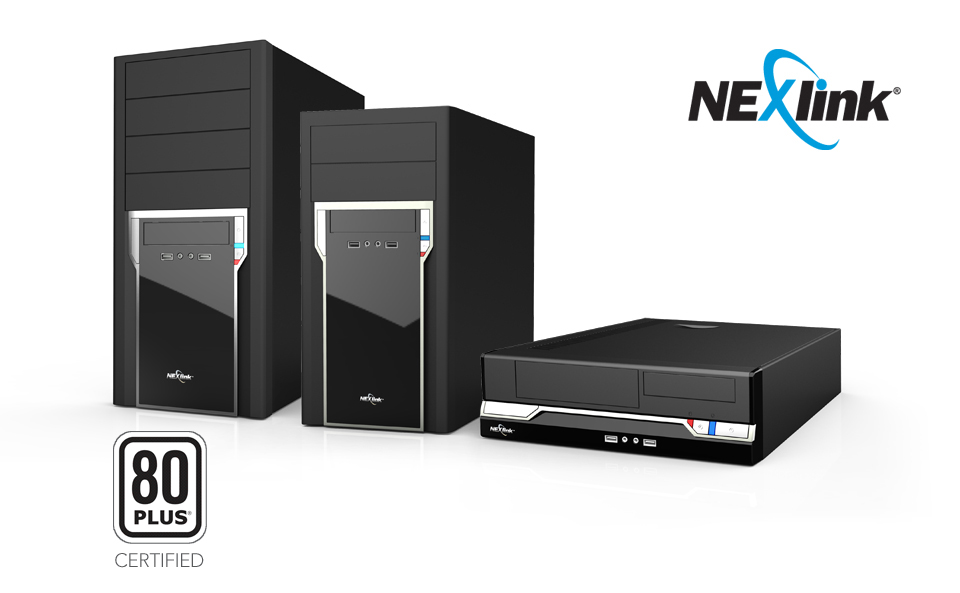
The new look of Nexlink computers

Check out the new look for Nexlink’s computers! Same great case, with a more modern face plate…

Those of us here at Homeland Secure IT have worked with computers from every major computer manufacturer you’ve heard of, and we are partners with many great providers of computers and servers, such as HP, Dell, Lenovo, Toshiba, etc…  However, for business computers, we tend to recommend the Nexlink line of computers.

Why wouldn’t we go with a mainstream solution for every client? After all, HP has a reputation as a quality business computer supplier, wouldn’t it be a great investment for any business?

Absolutely! HP does make a quality system, however, one of the things you are paying for when you purchase that new HP system is the name. HP has worked hard to create a presence in the business market and that has cost a fortune.

Other vendors, such as Nexlink, can offer comparable desktops, servers and notebooks, without the marketing and sales expenses attached to them, allowing you the best computer for your dollar!

Furthermore, the Nexlink products are some of the highest quality we have ever worked with. They use trusted components, such as Intel motherboards and Intel processors, nothing less than the best. The support from Nexlink is outstanding, and all the business systems we sell have a 3 year warranty with next day shipping should something be needed!

Should your business be considering new computers, servers or notebooks in the Greenville / Upstate, SC area, give us a call at 864.990.4748 or email info@homelandsecureit.com and let’s discuss if Nexlink is right for you!

Would you drive a car without a spare? Why would you not want a backup?

Would you drive a car without a spare tire in the trunk?  Auto makers are selling cars without spare tires!

How about operating your computer without a backup?

Not a week goes by that we don’t hear some horror story about computer owners losing data. It could be from a virus, a failed hard drive, a dropped notebook, even a misplaced or stolen notebook, but either way, the data is gone and one of the following generally takes place next:

  • An IT service professional may be able to recover the data if you have the device, and it has not been physically destroyed.
  • You recover from a backup that you have made (hopefully recently) but it may require the re-installation of the OS and/or applications by an IT support professional if your backup is not an image of the running system.
  • You write it off and start from scratch – losing all your data…

Either way, not a pretty picture if this happens to you.

All this can be avoided by obtaining quality backup software or cloud services to accomplish this. If you need assistance determining methods of disaster recovery for your home or business computer, or an entire network of computers and servers, please contact us here at Homeland Secure IT… We are partners with Servosity, Symantec, Quantum, Mozy and other backup solution providers. We have solutions for Apple Mac OS X, Linux, Microsoft Windows, Microsoft Server, Microsoft Exchange, Microsoft SQL and more!

864.990.4748 or info@homelandsecureit.com for more information in the Greenville / Upstate SC area.


Looking for a SIP trunking provider for your business? Try nexVortex! #nexVortex #SIP #ITSP

nexVortex SIP trunking for business

nexVortex SIP Trunking for Business

If you are currently using a SIP trunking provider for your business, have a look at what nexVortex has to offer. Compare it to your current provider and see how they stack up!

Homeland Secure IT became a partner with nexVortex after researching many other providers… We needed a reliable provider who could offer the features our clients needed at a price they could afford. We found that the quality of service and the feature set offered by nexVortex fit the bill, as did their pricing!

For instance, the nexVortex Business Elite Plan offers unlimited concurrent calls, 5000 minutes of outbound (US continental & Canada), 5 DID telephone numbers, E911 and disaster recovery for only $100/month. That is everything most of the businesses we work with require, though they do have a Business Pro Plan that is even less expensive at $40/month, and that has 2000 minutes of outbound calls, unlimited concurrent calls, E911 and one telephone number.

Need 50 DIDs? How about 100, or 1000?  nexVortex can provide that too, saving you lots of money in the process in many cases!

If you would like more information in the Greenville or Upstate, SC area, please call 864.990.4748 or email info@homelandsecureit.com. If you are outside of our area, that’s okay, click on the nexVortex logo and you can find everything you need on their website.

Unable to use SIP trunking due to an old phone system? We can help with that! We are have a solution that is right for your business!  Please call or email today!


1

Dollars & Sense: Transitioning your business to a Voice over IP phone system #VoIP #Telephony #Cisco #SMB

Pardon the pun with the “dollars & sense” thing, but really that is what it comes down to, whether it makes sense, not just the dollar amount.

Cisco Select SMB Partner Greenville Upstate SC

In my previous post, we looked at a company we will call “Business One”, a local small business using PSTN (Public Switched Telephone Network) with their old key phone system and asked the question “Are you paying too much for your business phone service?”

Obviously, there was money to be saved by simply changing how they have always done things, however, there was expense involved, which came in the form of the need for a new phone system. Let’s look at what is involved to move “Business One” from an aging key phone system to a new VoIP (Voice over IP) system.

First, let’s see what the current system comprised of:

  • 8 total extensions
  • 3 outside phone lines
  • Paging to a speaker (broken)
  • Paging to phones
  • NO music on hold option
  • NO Automated Attendant capability
  • NO voice mail (Simple answering machine turned on manually)
  • NO voice mail going to email
  • NO Caller ID display

We’re talking a very basic digital key system. It has accomplished what they needed, and nothing more.

So what would we be putting in place?

Cisco UC320W unified communications systemCisco’s new UC320W Unified Communications system, which is one unit that controls the local VoIP system, provides a security router, gigabit switch, wireless 802.11n and more.  This is the baby brother to the UC540 system, and it supports up to 24 extensions, 4 copper phone lines, and a fax/phone/credit card machine port.

With additional modules, it can support even more phone lines, at the expense of losing one extension for each additional outside line over 4.   (If you had 8 phone lines, you could only have 20 extensions).

Cisco SPA504G VoIP Phone

For desk sets, Business One has determined they need only the basics, no color display, bluetooth or MP3 player needed here.

We opted for the Cisco SPA504G, a 4 line display phone with outstanding audio quality, crystal clear speakerphone, dedicated headset port, message waiting indicator and an AUX port to connect the optional 32 button sidecar which allows the programming of single button speeddials, transfers, etc. These phones also have a network passthru for the connected PCs and Power Over Ethernet (POE).
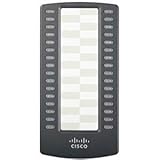
Cisco SPA500S 32 button sidecarTo enable the two people who answer phone the most there the ability to easily transfer calls to other worker voice mail and extensions, we added two of the 32 button sidecars (SPA500S). They can tell if someone is using their extension at a glance, and transfer a call they answered easily to another extension, or send it straight to that extension’s voice mail with the push of one button.

The old phone system does not use CAT5 wiring, so new wiring was required to several extensions, and since there are no power outlets in some of those locations, a Cisco ESW-520-8p switch was in order. This switch provides 8 ports of 10/100 ethernet WITH Power Over Ethernet (Meaning, all 8 extensions would not require to have a power adapter plugged into the wall)

The client had an existing 10/100/1000 (gigabit) network for their computers, but it was decided that keeping the networks isolated would be desirable. That fact, combined with the desire to have Power Over Ethernet and long runs of cabling that were required to the warehouse area made for a more costly solution than may be necessary in many cases. However, the complete, turn-key solution rang in at about $4500 dollars. By turn-key, we mean, start to finish: Consultation, installation, configuration & training.

By switching to to this VoIP solution and to the SIP trunks as outlined in the previous post, in less than 2.5 years, the new VoIP system will pay for itself, while providing many features this client has never enjoyed!

New features that Business One can enjoy:

  • Automated Attendant (Many calls are handled by the phone system)
  • Voice Mail for each extension (will replace a single answering machine)
  • Night Attendant will provide different greeting/functions after hours
  • Music on Hold
  • Voice mail is sent to their email to listen to on a smartphone
  • Caller ID so they can screen those salespeople!
  • Display phones loaded with features
  • Ability to transfer a call to their cell phones, or even forward all calls
  • Full call logging, see at a glance every incoming/outgoing call
  • 8 Simultaneous calls through SIP (instead of the 3 they had before)
  • Ability to use inexpensive SIP trunks for service!

That’s just the tip of the iceberg! Their old system has seen better days, so switching to a full fledged VoIP solution and taking advantage of a decrease in service will pay for itself…

Now, if they would just consider the Cisco SPA525G2 phone, with its beautiful color display, built-in MP3 player, bluetooth connectivity to headsets and cellphones, then they would be stylin!

If you would like to talk about how a system like this could be implemented at your business, please call us at 864.990.4748 or email info@homelandsecureit.com. We are your Greenville / Upstate SC Cisco SMB Select Partner!