
Microsoft, Adobe and Java Updates – Please Update Your Systems!!!!

Today we had a young lady come into our office with a severely infected notebook. It had multiple rootkits, trojans, spyware, etc….

The computer did not have updates on it for the Microsoft Windows Operating System, Microsoft Office, or Adobe Reader / Flash / Air.  Nor did it have the latest Java on it. Anti-Virus was handled by AVG (Free).

Vulnerabilities in the operating system and applications were the likely culprit that allowed the malware in, but either way, the computer was badly infected, and data possibly compromised.

Please, use Microsoft Update on your PCs and make sure your Adobe products and Java are up to date! That, combined with quality anti-virus like Trend Micro Internet Security, Trend Micro Worry-Free Business Security, etc, may protect you from a costly infection and provide much greater security for your personal and/or company data.

If you think for a moment that your computer may be compromised, be sure to contact your computer service professional! Don’t take a chance with your security.

Homeland Secure IT offers complete computer, server & network support, repair, security & sales in Greenville and the Upstate of SC. Please call 864-990-4748 or email info@homelandsecureit.com for more information or a free evaluation! Our typical virus cleanup / removal rates are very competitive with rapid turnaround!

Microsoft Business Productivity Online Suite and your Outlook work well together! #SaaS #BPOS #MS

Microsoft Office Outlook 2010

Microsoft Office Outlook 2010 With BPOS Goodness

So you are setup with a FREE trial of Microsoft’s Business Productivity Online Suite and are enjoying all the online apps but something is missing, you don’t want to use web apps, you want to use all the features of Microsoft Office Outlook 2007 or 2010 that you have already paid for and know your way around.

Well it is possible to have your cake and eat it too! *IF* you signed up for the BPOS Standard trial instead of the “Deskless Worker” trial, then you can configure your Outlook to view the same Exchange data you see with Outlook Web Access. You will see the same emails, the same contacts, the same tasks, folders, public folders, calendars etc!

Wait, you didn’t get the Standard version of the BPOS demo? That’s okay, you can log back into the portal and activate the Standard version, then deactivate the Deskless Worker product and not even lose your configuration. YOU MAY lose your emails though and have to start over, but hey, it’s just a demo, you didn’t have that much anyway!

Okay, so back to task at hand, getting Outlook configured. It’s EASY, relatively speaking to accomplish this. First you log into your online mail app (OWA) at http://mail.microsoft.com and once in there, click on OPTIONS at the upper right hand corner, then, select ABOUT from the left hand menu. You will see something that looks like this:
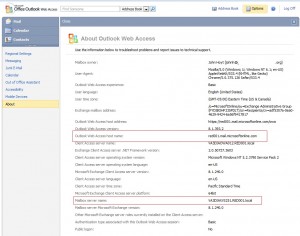
BPOS configuration data from OWA

Data to gather from OWA to setup Outlook

The important information for you to gather will be the “Outlook Web Access host name”, and the “Mailbox server name”.

Now, close out Outlook on your desktop and go to START/Control Panel and select Mail (If using Win 7 64 bit, once you open Control Panel, type “mail” in the Search Control Panel input at the top right hand side and select “Mail (32-Bit)”).

Select “Show Profiles” and add a new one… Let’s call it “BPOS”.  Next, select the checkbox for “Manually configure server settings or additional server types” then hit “Next >”. Select “Microsoft Exchange or compatible service” and hit “Next >”.

In the “Server:” field, put the information you gathered from Outlook Web Access for the Mailbox Server Name… (Ex: A3DIAXVS251.RED001.local). For “User Name:” enter your email address, then select “More Settings”. Don’t bother hitting “Check Name” as it will not function (yet)…

Select the “Connection” tab, at the bottom, select “Connect to Microsoft Exchange using HTTP” and then hit the button “Exchange Proxy Settings…”, for “Use this URL to connect to my proxy server for Exchange:”, you need to enter the Outlook Web Access hostname from OWA (Ex: red001.mail.microsoftonline.com) and do not include the “https://” or the “/owa” here, just the hostname.

You can select to “Only connect to proxy servers that have this principal name in their certificate” if you wish, but not necessary.

DO select both of the checkboxes at the bottom for “On xxxx networks, connect using HTTP first, then connect using TCP/IP”, and set the proxy authentication settings to “NTLM Authentication”.

Click OKAY and apply those settings and now try to open Outlook… You should be prompted with a login.

Sounds complicated? Kinda-sorta, but it works well, and you only have to do it once. You can also use the Microsoft single signon client if you wish, which will remember your login and password and allow you to open Outlook without any issue, but some company policies may not allow you to install additional software, or automatic login applications so the above should work for you.

If you get stuck, please reply here or shoot me an email at info@homelandsecureit.com and I will try to give you a hand.

Oh my, another #greenville computer user lost their data – Wish they had used our online backup service…

Just saw where another computer user in Greenville could have avoided a nightmare. They posted their computer was toast. Bad hard drive according to some geeky type people that looked at it. The computer is back to running, but their data is GONE.

Homeland Secure IT offers many backup solutions that can protect you from this scenario, but our favorite is Servosity Online Backup, which runs on your computer, regardless of the operating system of that computer (Server, Workstation, Notebook, etc) and quietly backs up your data to a secure server located “in the cloud”.

It is affordable, it is reliable, and the president of Servosity is an Upstate SC native. What more could you ask for?

If you would like to try this awesome online backup service, we offer a FREE trial, just call 864.990.4748 or email info@homelandsecureit.com for additional details or get setup for a trial.

Please do it before it is too late. Losing your pictures, music, documents, etc is a painful experience, and potentially devastating. The cost of recovering hard drives can be in the thousands!

SECURE IT ALERT: QuickTime Movie Handling Vulnerability

Secure IT Alert Header

Homeland Secure IT Alert

Secure IT Alert for August 13, 2010

The following information comes courtesy of WatchGuard…

QuickTime Movie Handling Vulnerability Only Affects Windows Users

Severity: Medium

13 August, 2010

Summary:

  • These vulnerabilities affect: QuickTime 7.6.6 and earlier for Windows (Mac version is unaffected)
  • How an attacker exploits them: By enticing your user into viewing a maliciously crafted movie
  • Impact: An attacker could execute code on your user’s computer, potentially gaining control of it
  • What to do: Download and install QuickTime 7.6.7 for Windows or let Apple’s Software Update tool do it for you at your earliest convenience

Exposure:

Late Yesterday, Apple released a security update to fix a single vulnerability in the Windows version of QuickTime, their popular media player. According to Apple, the error logging component in QuickTime suffers from a buffer overflow vulnerability. By luring one of your users into viewing a maliciously crafted movie, an attacker can exploit this buffer overflow to execute code on that user’s computer, with that user’s privileges. Since most Windows users have local administrative privileges, attackers could often leverage this flaw to gain complete control of Windows machines. 

Though Apple’s QuickTime update only fixes one security flaw, it is a fairly risky one. If you use QuickTime in your network, we recommend you update it at your earliest convenience

Solution Path:

Apple has released QuickTime 7.6.7 to fix this security issue. Windows administrators who allow QuickTime in their network should download, test, and deploy the updated version at your earliest convenience. By default, Apple’s download bundles iTunes with QuickTime, but because iTunes often has security issues of its own, we recommend that you select the option of downloading QuickTime alone.

For WatchGuard Users:

You can mitigate the risk of this flaw by blocking .mov files with your WatchGuard appliance. QuickTime is primarily used to play .mov files, which is likely the type of movie file an attacker would leverage to exploit this flaw. You can use the HTTP, SMTP, and FTP proxy on some WatchGuard appliances to block files by their extension. If you want to block QuickTime movie files, the links below contain video instructions showing how to block them by extension (.mov). Keep in mind, this technique also blocks legitimate movies as well.


Status:

Apple has released updates to fix these issues.

References:

This alert was researched and written by Corey Nachreiner, CISSP.

If you require assistance with this or any other network security related issue in the Greenville / Upstate SC area, please call 864-990-4748 or email info@homelandsecureit.com

Homeland Secure IT Alert Footer

Homeland Secure IT Alert

1

Microsoft Windows 7 Professional for only $29.99?? No way… YES WAY! If you are a student…

Microsoft Windows 7 Professional

Microsoft Windows 7 Professional

Yes, the subject is correct! Microsoft is offering students the deal of a lifetime…   Windows 7 Professional for only $29.99!

Follow this link to get the whole scoop…  In short you must have an email address ending with .edu, or be enrolled at a college listed as eligible on that site.

There is also a link at the bottom of that page for Microsoft Office Professional Academic version for $79.95, but last I checked, that link is broken.

If you have not checked out Microsoft Windows 7 and Microsoft Office yet, you should do so using the free trials that are available, or if you happen to be a student, upgrade to both for only 100 bucks!?!  What a great deal! What a way to start out the new school year, with the latest software!

If you really need a reason to upgrade other than features and having the latest, how about security? Windows 7 Professional and Office 2010 Professional address security better than any previous version!

Students with Macs are loading Windows 7 Professional on their computers for compatibility with the latest software and requirements of colleges, giving them the best of both worlds!

If you require assistance, please email info@homelandsecureit.com or call 864-990-4748 – we can provide help in installing either of these software packages to those in the Greenville / Upstate SC area.

1

Video security / surveillance for your home may be more affordable than you think

Caught in the act thanks to a security camera

Caught in the act thanks to a security camera

Do you ever wonder what is going on at your home when you are not there? Maybe you just want to know if someone approaches your door, or if a vehicle pulls into your driveway?

Call me paranoid, but I do!  We have surrounded our home and businesses with full color, night-vision cameras that record to a DVR (Digital Video Recorder) and in the event of motion, will send alerts in email to our phones, allowing us to see what we are missing out on.

In addition to that, we can view our cameras using a supported smart phone or any computer equipped with a web browser from anywhere in the world. This has come in handy several times, such as the other day when our alarm company called and said the fire alarm was going off at our home. Talk about a scary moment, but having the ability to see that the house was not full of smoke helped set our mind at ease and to cancel the call to the fire department (before they charged us money).

We receive discounts on our home and business insurance thanks to having both premise security in the form of intrusion detection alarms with smoke/fire/glass break and video surveillance keeping a watchful eye over the property. The cost of the alarms and video security will pay for themselves in reduced insurance premiums.

Camera systems have dropped dramatically in price over the last few years allowing home owners to experience the same security as businesses.

Whether you want a single camera watching your front door, or possibly facing towards where your boat / PWC is parked, or complete 360 degree exterior protection, it is all possible! Please call us at 864-990-4748, email info@homelandsecureit.com or stop by our offices if you would like more information about what is available or to see a demonstration of an installed system!

1

SECURE IT ALERT: Microsoft August Security Bulletin Update

Secure IT Alert Header

Homeland Secure IT Alert

Homeland Secure IT Alert for Wednesday, August 11, 2010

Microsoft has updated their August Security Bulletin as of August 10, 2010…

A webcast is scheduled for 2:00 PM Eastern on August 11, 2010 – Register here

The following information was provided courtesy of US-CERT National Cyber Alert System
Technical Cyber Security Alert TA10-222A:

Systems Affected

  • Microsoft Windows
  • Microsoft Office
  • Internet Explorer
  • Microsoft .NET Framework
  • Microsoft Silverlight

Overview

Microsoft has released updates to address vulnerabilities in Microsoft Windows, Microsoft Office, Internet Explorer, Microsoft .NET Framework, and Microsoft Silverlight.

I. Description

The Microsoft Security Bulletin Summary for August 2010 describes multiple vulnerabilities in Microsoft Windows, Microsoft Office, Internet Explorer, Microsoft .NET framework, and Microsoft Silverlight. Microsoft has released updates to address the vulnerabilities.

One of the bulletins released, MS10-046, addresses a previously identified vulnerability in the Windows Shell that is actively being exploited.

II. Impact

A remote, unauthenticated attacker could execute arbitrary code or cause a vulnerable system or application to crash.

III. Solution

Apply updates

Microsoft has provided updates for these vulnerabilities in the Microsoft Security Bulletin Summary for August 2010. The security bulletin describes any known issues related to the updates. Administrators are encouraged to note these issues and test for any potentially adverse effects. Administrators should consider using an automated update distribution system such as Windows Server Update Services (WSUS).

IV. References

Microsoft Security Bulletin Summary for August 2010 –http://www.microsoft.com/technet/security/bulletin/ms10-aug.mspx
Microsoft Security Bulletin MS10-046 – http://www.microsoft.com/technet/security/bulletin/MS10-046.mspx
US-CERT Vulnerability Note VU#940193 – http://www.kb.cert.org/vuls/id/940193
Microsoft Windows Server Update Services – http://technet.microsoft.com/en-us/wsus/default.aspx


Summary:In short, apply updates to all your Microsoft Windows based systems ASAP using Microsoft Updates or WSUS.

If you require assistance with Microsoft Windows Updates or WSUS, please call us at 864-990-4748 or email info@homelandsecureit.com

Homeland Secure IT Alert Footer

Homeland Secure IT Alert

Computer Service: Operating System Not Found error may not be anything to cry over

What ever you do - don't panic!

Whatever you do - Don't panic...

It seems like once a month or so we get a phone call from someone who is freaking out over their computer not booting up…

In the case of the system giving a blank / black screen, or the even more ominous “Operating System Not Found” / “Missing operating system” message and nothing further upon boot up, you might be surprised to find that the solution is easy…

Many newer computers come from the factory with the ability to boot from external media, such as USB hard drives, flash memory sticks, card readers, smart phones such as the iPhone, digital cameras and other devices. This applies to machines running Microsoft Windows XP, Vista, 7, and even Windows Server.

I always suggest to the person with the trembling voice that they take a deep breath, and unplug anything they may have plugged into the computer since the last time it was booted up. Remove any memory cards, flash drives, USB devices, etc. Make sure there are no disks in the CD drive or floppy drive (What? Someone uses a floppy?) and then reboot.

In more cases than I could possibly remember, their machine will boot up as normal and their blood pressure will drop tremendously.

I have heard stories that unscrupulous computer service technicians will “diagnose” this problem as a faulty hard drive and charge the client for unnecessary computer repair and parts. Hopefully, if this is the case, you will not fall into that trap because you just read this post. If I saved you from a heart attack, please respond here, or buy me a coffee.

The computer can be set to NOT boot from USB devices in most cases, so if you encounter this regularly and wish to make that change, it should be possible in the BIOS. Should you require assistance with that, or your system does NOT boot up even with USB and memory devices unplugged, please give us a call at 864-990-4748 or email info@homelandsecureit.com. We offer complete computer service, repair and sales to Greenville / Upstate SC.

1

Free Trial of Microsoft Business Productivity Online Suite #cloudcomputing #bpos

Microsoft Business Productivity Online Suite

Microsoft BPOS

Are you tired of dealing with POP3 or IMAP mail from your ISP? Tired of SLOW email? Do you want to share calendars between coworkers? Do you want to see the same contacts, calendar entries and emails on your phone as you do in your Outlook on your desktop and also via a web interface? Do you want your mobile workforce to have access to the same resources you do, including public / shared calendars & contacts? Want support for your Mac, Apple iPhone, iPad, Android, Blackberry?

Then Microsoft Exchange is the way to go, however, there are costs associated with hosting your own Exchange server that are unattractive to many smaller businesses.

Fortunately there are Hosted / In-The-Cloud alternatives, such as Microsoft’s Own BPOS, the Microsoft Business Productivity Online Suite which features a Hosted Exchange server, SharePoint, Office Live Meeting and Office Communications Online. Using BPOS can eliminate the need to purchase, deploy, maintain, backup and eventually upgrade a Microsoft Windows Server with Microsoft Exchange Server. The services are hosted “in the cloud”, in a data center, where all maintenance and upgrades are maintained FOR you. No need to worry with backups either.

This solution isn’t right for everybody, but it could be the answer to your problems if you have a smaller office, a large mobile workforce, a small budget or possibly no central location to place a server at. Would you like more information? Please call us at 864-990-4748 ext 201 or email info@homelandsecureit.com to arrange for a free, no obligation consultation.

Free 30 Day BPOS Trial

Free 30 Day BPOS Trial

Optionally, you can sign up for a FREE 30 day trial of BPOS – Business Productivity Online Standard Suite – This trial includes 20 user licenses for Exchange Online, SharePoint Online, Office Live Meeting, and Office Communications Online.

Homeland Secure IT offers Hosted Microsoft Online Services including the full BPOS / Business Productivity Online Standard Suite (Exchange Online, SharePoint Online, Office Live Meeting & Office Communications Online) as well as the Business Productivity Online Deskless Worker Suite (Exchange Online & SharePoint Online), and each service individually.

If you are in the Upstate / Greenville SC area, we can assist you with configuring your Outlook to work with the Hosted Exchange Online service at your location or ours.

We also offer full remote support and phone support to clients anywhere in the United States.