1

Remote Temperature Monitoring for your Server Room or Wiring Closet

Server Room Fire

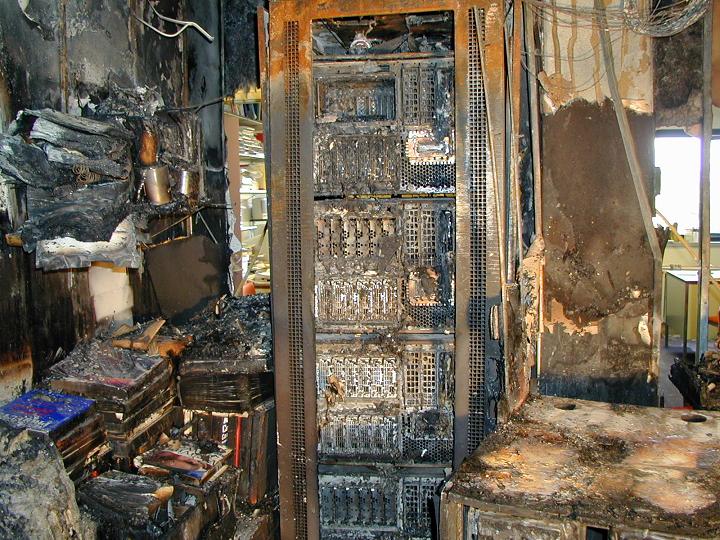
Let's hope your server room never gets THIS hot!

We are helping a client move their entire network (servers, computers, switches, firewalls) to a new facility. Unfortunately, the new digs do not allow for an optimum placement of their servers. They are to be relegated to an upstairs location in the building, and an air conditioner system is being installed to provide the cooling required to keep everything from melting down.

The worst part is that this far removed server room will contain 4 servers, a computer used for remote access, switches, backup solutions, VoIP system, UPS and various other components, and nobody will be close by to hear if alarms are going off for the RAID, UPS or overheat conditions.

What to do? We will use software to monitor the device temperatures, and we are suggesting a remote temperature sensor for the entire room which will maintain a chart of temperature trends, and allow us to set email alerts in the event the room itself exceeds a determined threshold.

These devices are inexpensive insurance against a meltdown that could cost thousands of dollars to recover from, not to mention downtime for the business affected. We will also be recommending an IP camera in that room that will allow remote visual monitoring, including alarms should something move in the room itself (there will be a log of who entered the room this way). And should the server and room temperatures rise beyond the threshold and alert someone via email, they can then view the camera with a browser or smartphone (Android, iPhone or Blackberry) and see if the room is in flames.

Should you be interested in one of these devices for your Greenville / Upstate server room, or wiring closet, please contact us at 864.990.4748 or info@homelandsecureit.com to discuss options that are available for you.

Just Who is Promoting Cloud Computing Solutions? Accountants?

Cloud Computing Solutions - Google Apps - Microsoft BPOS

Cloud Computing

With more and more cloud computing / SaaS offerings becoming available to us, just who is promoting them?

Hunter Richards, a Market Analyst in the field of accounting has a poll on the SoftwareAdvice.com site asking “Are accountants recommending the cloud yet?” That is a great question, unfortunately there was only a “Yes” or “No” answer. If there had been a “Sometimes” option, I would have selected it.

In our experience we have seen a couple clients move to cloud based solutions based on suggestions from their accountants. One of them seems to be happy, and another is currently not happy, but mainly due to a bandwidth issue which may be cleared up soon for them. We have another one that it has been suggested to, however they have not made the move.

What holds accountants in particular back from suggesting cloud solutions to their clients I can’t tell you, but here are some reasons I have heard from our own clients for not accepting the technology:

  • Fear of the unknown (Fear of change)
  • Potential for internet outage and data being unreachable
  • The recurring financial burden
  • Possible requirement to increase their bandwidth (and in turn recurring costs)
  • Loss of control of  data (applies mainly to system admins)
  • Security concerns (compliance, breaches, etc)
  • No urgency to make a change (what they use works fine)
  • Don’t wish to learn how to use a new system
  • Fear that the online provider could fold
  • Fear that once using the online system, rates may not remain stable
  • Nobody they know is using online solutions
  • Waiting for cloud computing to become more mature

While some of these reasons may seem minor, the one that comes up more than any other is not about expense, but concern that an internet outage would put them out of business. With the turmoil in the Middle East and Egypt effectively shutting down the internet for several DAYS, this may be of even more concern to certain industries, even though we are told to rest assured that the Internet Kill Switch would never be used here in the US.

When we are consulting with our Greenville and Upstate SC based small and medium business clients regarding a move to a cloud based solution, we have to offer the good, the bad and the ugly sides of the technology to them as we do not wish to leave any stone unturned. We are striving to provide a reliable network and have the “big picture” in mind. On the other hand, an accountant could find that suggesting SaaS results in recurring revenue for them, but if the service is not up to their clients expectations, they could ultimately lose a client. So that may be why more accountants are not actually steering their clients towards cloud computing.

It is my suggestion that a business contemplating the switch to a cloud based solution as recommended by their accountant also get their IT service professionals involved during the planning stages in order to avoid any pitfalls.

Should you wish to discuss a similar move for your business, or if you are an accountant that is interested in discovering more about cloud computing or want to team with a local IT provider, please call 864.990.4748 or email info@homelandsecureit.com

1

Google Chrome Browser Continues to Gain Ground in the Browser Wars

Browser Market Shares

Google Chrome is Gaining Ground Fast

Are you still using Internet Explorer? The majority of people are that hit our website and most others that track this information, but, as you can see from the graph on the right, alternative browsers are gaining ground.

Microsoft Internet Explorer, like it or not, is the de facto “standard” that web sites and web applications are built to support. There are many reasons for that, and obviously the main one is that IE is shipped with Microsoft Windows Operating Systems, and Microsoft Windows dominates as the OS of choice for both individuals and businesses.

As Apple Mac OS, Linux and other operating systems become a bit more mainstream, the alternative browsers that these systems ship with will cut into the Microsoft IE market share, but there is more going on here than a switch to new operating systems.

You are probably way ahead of me on this, but due to concerns over security, there seems to be a mass exodus away from IE. We’ve heard from our clients that they are worried about the seemingly endless flow of vulnerability announcements from Microsoft and then the subsequent patches that must be installed in order to ensure they can safely browse the web.

That, combined with the fact that other browsers are offering what feels like a faster browsing experience, a slew of new features, additional plugins or addons not available on IE, and a shiny new look makes it easy to see why the IE market share has dropped and Chrome has come up.

Chrome recently added some Active Directory integration making the browser even better than before for System Administrators.

Surprisingly, Mozilla Firefox, the second most popular browser, has actually been declining in popularity along side IE, while Safari and Opera have remained pretty constant in the low end of the scale.

With Chrome breaking into the ten percent market share, and pulling away from Apple’s Safari rapidly, it appears that Chrome could overtake Firefox in the next 12 to 18 months. Very interesting information.

Click on the graph for the link to the original article and more information.

No matter which browser you use, remember, there ARE security flaws. Chrome is not impervious to exploits, so, please remember to browse responsibly! Use current anti-virus / anti-malware, and common sense. (IE, Don’t install addons, plugins or codecs etc that you do not trust).

If you would like to discuss security concerns or whether a particular browser may be right for your business here in Greenville or the Upstate, please call 864.990.4748 or email info@homelandsecureit.com

The End Is Near! All IPv4 Addresses Now Spoken For

IPv4 Exhaustion

IPv4 Exhaustion Prediction

We knew the day was coming, and today we learned that it was sooner than later.

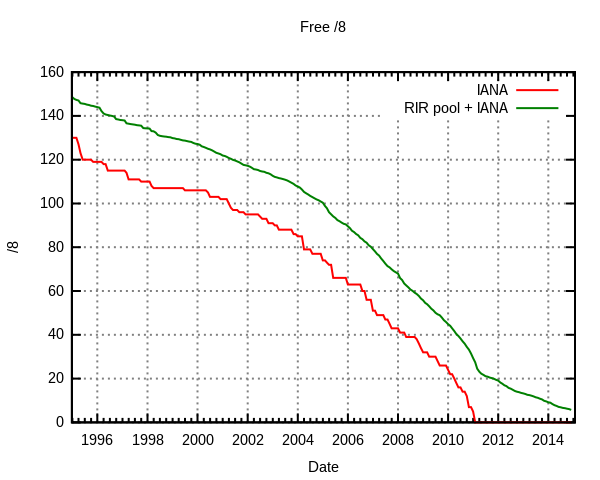
IANA (Internet Assigned Numbers Authority), the organization that manages IP addresses and domain allocations has assigned two IPv4 address blocks to APNIC (The Asian-Pacific Network Information Centre), which in turn has caused a provision in the IANA rules to go into affect, releasing the last five IPv4 address groups totaling 82.5 million addresses to the regional internet registries.

So that’s it for the total pool of 4.3 billion IP addresses!

Where do we go from here? IPv6 baby! It has been there waiting in the wings for this moment, and now it is time for it to shine. ISPs will be left with no choice but to begin deployment.

What is interesting is that the graph on the left, from the Wikipedia site about “IPv4 Address Exhaustion” was spot on in predicting the end…

It is time (actually past time) to be planning for your own future, meaning, getting your infrastructure ready for the IPv6 deployments that will be coming. You may need some new hardware, and certainly a few configuration changes, but either way, you should be working with your network support professional to ensure you are ready.

If you need assistance in the Greenville or Upstate, SC area, please call upon us. We offer computer, server and network support, service, repair, sales and consultation.  864.990.4748 or info@homelandsecureit.com

All of our partner companies (Cisco, WatchGuard, SonicWall, etc) offer IPv6 ready firewalls, security appliances, routers, and more!

1

Secure IT Alert: Microsoft Investigating Potential Security Threat to Windows OS

Secure IT Alert Header

Homeland Secure IT Alert

Secure IT Alert for Monday, January 31, 2011

Microsoft has announced in Security Advisory 2501696 that they are investigating a potential vulnerability that may exist in ALL current supported editions of Microsoft Windows (Including Windows 7, Server 2008, Vista, XP and Server 2003). In fact, the only version that may not be affected would be the Server Core installations.

According to the bulletin, Microsoft is aware of the “proof-of-concept” code that has been released, so they are looking into it further, though they have seen no “active exploitation of the vulnerability”.

MHTML is the culprit and apparently, it IS possible (under certain conditions) for the vulnerability to allow an attack to inject client-side scripts in the response of a web request run in the context of the user’s Internet Explorer. The script could then spoof content, disclose personal information or emulate any action that the user could actually take on the affected web site. (IE, make selections, input data, etc).

What can you do to protect yourself? According to MS, you could lock down MHTML, set your internet security zone settings to “high” to block ActiveX controls and Active Scripting (in IE, Tools, Internet Options, Security, Internet, Security level for this zone and set slider to High). You could also set IE to prompt before running “Active Scripting” or disable “Active Scripting” all together in the Internet and Local intranet security zone. (In IE, Tools, Internet Options, Security, Internet, CUSTOM LEVEL, then under Settings, find the Scripting section and set Active Scripting to “Prompt” or “Disable”.   Same under Local Intranet.). You can then add sites that you trust to the IE Trusted sites zone.

Use of an anti-virus software package like Trend Micro Titanium or Trend Micro Worry-Free Business Security which has the ability to watch web traffic is HIGHLY recommended. And of course, you could use an alternative browser, such as Google Chrome, or Mozilla Firefox…  Many firewalls and security appliances from vendors like Cisco, WatchGuard and SonicWALL have the ability to block this type of traffic as well.

If you have questions or concerns about your personal computer or an entire business network in the Greenville / Upstate, SC area, please call 864.990.4748 or email info@homelandsecureit.com

Secure IT Alert Header

Homeland Secure IT Alert

Trend Micro Worry-Free 7.0 Business Security Patch Build 1396 Released

If you are running Trend Micro Worry-Free Business Security 7.0, then you should have received an update notification that reads like this:
 
A new patch has been released: “WFBS 7.0 Critical Patch Build 1396”.
To view the readme and get the install package:

    1.   Visit the Trend Micro Download Center from the Small Business tab on the Trend Micro home page
    2.   Select your product under the “Small Business” category
    3.   Select the “Product Patch” tab

Pretty self-explanatory, however, if you require assistance, please call us at 864.990.4748 or email info@homelandsecureit.com
 
Here’s a direct link to the download section: http://downloadcenter.trendmicro.com/
 
Here’s a list of changes:
 
 
 1. Overview of this Critical Patch Release
=======================================================================
   NOTE: Please install the critical patch before completing any
         procedure in this section (see “Installation”).
  
   1.1 Resolved Known Issues
   =====================================================================
   1. Users may receive the ESENT Event ID 490 notification in the
      Application Event Log after installing the Security Agent.
     (Critical Patch 1357, hot fix 1360)

   2. Users may experience performance issues when saving Microsoft(TM)
      Office(TM) files to a shared network drive on a 64-bit server.
     (Critical Patch 1357)
   3. The performance of some Worry-Free Business Security 7.0 servers
      may slow down after a few weeks. (Critical Patch 1357, 1347)
   4. Users may experience high CPU resource issues when logging onto
      Worry-Free Business Security (WFBS) 7.0. (hot fix 1359, 1362)
   5. Users may experience performance issues when processing Microsoft
      Office files. (hot fix 1361)
   6. If multiple users log on to the same server and one of them opens
      the Security Agent UI, the client UI will open for the other users
      too. (Hot Fix 1362)
   7. Users may experience product update issues such as: delays,
      updating earlier than scheduled, clients that will not update.
      (Hot Fix 1365)
   8. Users might experience send/relay email issues when sending email
      from the email server. (hot fix 1366)
   9. Users may experience the following network drive issues:
      1) network drive disconnects or maps to different folders
      2) remote applications unable to launch after upgrading from
         previous versions.
      (Hot Fix 1369)
   10.WFBS 7.0 GM does not remind user to click ¡§No¡¨ when open the MSA
      configuration page, User may failed to open the MSA configuration
      page if they select ¡§Yes¡¨.

We are proud to be your Greenville / Upstate Trend Micro partner! Sales & Support. Installation and Consultation…GreenvilleWe are proud to be your


Google Voice now allows you to port your cell phone number

This has been a long time coming, but Google has finally added the ability to port your cellphone number.

The downside is that there is a 20 dollar fee to do this, but the upside would be that for those who do, you could have that one number you give out to everyone now routed to your Google Voice account, and through the use of rules / filter, control what becomes of the incoming calls.

For instance, you could have all phone calls from a particular number routed to your new cell phone number when they call the Google number.

You could create client lists and control what becomes of those calls too. During business hours, send them to your cell number, but after hours – straight to voice mail.

The action of porting your existing number is pretty easy. On your Google Voice account simply go to SETTINGS, then select the CHANGE/PORT link beside your Google Voice number. Remember, there is a 20 dollar charge, and there are restrictions from many wireless providers.

If you need help in Greenville / Upstate SC, let us know, we will do what we can!  864.990.4748 / info@homelandsecureit.com

WatchGuard XCS 9.1 Update 2 With Spam & Data Loss Prevention Enhancements

Re-posted direct from the WatchGuard announcement:

WatchGuard is very pleased to announce the release of WatchGuard XCS version 9.1 Update 2 for all XCS Extensible Content Security appliances.

WatchGuard XCS 9.1 Update 2 includes significant enhancements to our award-winning WatchGuard XCS Extensible Content Security solutions. This release includes enhancements in spam protection, management and reporting, as well as data loss prevention functionality for XCS email security.In addition, XCS 9.1 Update 2 contains a number of fixes for issues reported by WatchGuard customers.

The key advancements of XCS 9.1 Update 2 include, but are not limited to:

  • New WatchGuard XCS SecureMail Email Encryption add-on subscription for integrated privacy and protection of email communications; provides transparent, policy-based email encryption directly from the WatchGuard XCS appliance without the need for a local encryption server or additional desktop software
  • New WatchGuard XCS SecureMail Branding add-on subscription for custom, fully-branded encrypted email communications
  • XCS Outlook Add-in that places special Spam and Not Spam buttons in end user Outlook toolbar; helps improve overall XCS efficacy while giving users more control over their messages by providing:
    • end user ability to report false positives where legitimate messages were marked as spam
    • end user ability to report false negatives where a good message was mistakenly tagged as spam
    • improved training of WatchGuard XCS appliance
    • relays training feedback to WatchGuard
    • adds sender to end user’s personal Trusted/Blocked Sender list
  • Enhanced visibility into spam processing with new Intercept Component report that provides detailed information regarding:
    • frequency of spam received based on each spam category
    • token analysis score of messages received
    • Intercept component contribution to spam score
  • Improved redundancy with more connections to WatchGuard XCS Security Connection to ensure XCS security, updates, and services are always up and running
  • And many more quality improvements and enhancements

If you’re an active LiveSecurity subscriber, you can upgrade to XCS 9.1 Update 2 free of charge.

Does This Release Pertain to Me?

WatchGuard XCS 9.1 Update 2 includes many important new features and enhancements as they pertain to spam efficacy, end user experience, secure email communications, data loss prevention, and redundancy of security and services. If you wish to take advantage of any of the updates listed above, or those mentioned in the Release Notes, you should consider upgrading to version 9.1 Update 2. Please read the Release Notes before you upgrade to understand what’s involved.

How Do I Get the Release?

WatchGuard XCS customers who have a current LiveSecurity Service subscription can obtain this update without additional charge by downloading the applicable package and/or XCS Outlook Add-Ins from the Software Downloads web page, which also includes clear installation instructions. As always, if you need support, please enter a support incident online or call our support staff directly. (When you contact Technical Support, please have your registered Product Serial Number, LiveSecurity Key, or Partner ID available.)

  • U.S. End Users: 877.232.3531
  • International End Users: +1.206.613.0456
  • Authorized WatchGuard Resellers: +1.206.521.8375

If you require assistance installing these updates, need to purchase a WatchGuard LiveSecurity service subscription or a WatchGuard product, please call 864.990.4748 or email info@homelandsecureit.com – We are proud to be your WatchGuard partner & reseller in Greenville / Upstate, SC!

WatchGuard Fireware XTM & WSM 11.4 Released for XTM 2, 5, 8 and 1050 Appliances

WatchGuard has released FireWare XTM 11.4 and WSM 11.4.

This release is available immediately and this latest security subscription is for WatchGuard XTM 2, 5, 8 and 1050 appliances.

In addition to enhancements covering just about every aspect of the product functionality, including: Security, centralized management, authentication, reporting and wireless, the following has been addressed:

  • v11.4 allows better management of thousands of applications from Skype to Facebook, YouTube and more.
  • New centralized management features will simplify the task of deploying security policies across multiple appliances. Templates are more flexible than ever, with inheritance and override settings that allow policies to be deployed across one, some or all appliances under the centralized management.
  • Configuration History & Rollback for devices under centralized management gives the administrator the ability to “turn back the clock” and rever to a previous known good configuration when using the WSM Management Server.
  • New authentication features will help ensure that every user and/or group has the correct security policy. These include the ability to authenticate users who are on Microsoft Terminal Servers or Citrix Server; support for multiple Active Directory groups, 802.1x authentication for the XTM 2 Series Wireless models and more!
  • Enhanced IPS delivers rock-solid security with great efficiency and ease of configuration; IPS can now be configured independently of the security proxy/ies.
  • New reporting functionality includes reports on Application Control and on several other functional areas, such as DHCP lease activity.
  • Rogue wireless access point detection for the XTM 2 Series Wireless models.

In addition to the features listed above, 11.4 includes many smaller enhancements and bug fixes in many different areas of Fireware and WSM.

Active LiveSecurity subscribers can upgrade now free of charge!

If you would like additional information about these updates, need assistance applying the update or would like to renew your WatchGuard LiveSecurity subscription or purchase a WatchGuard product in the Greenville / Upstate SC area, please call 864.990.4748 or email info@homelandsecureit.com. We are WatchGuard partners and resellers!

2

Have you seen “Who’s Afraid of Virgina Woolf?” at The Warehouse Theatre? If Not, Order Tickets NOW! #Greenville

Who's Afraid of Virginia Woolf?

Who's Afraid of Virginia Woolf?

Unable to make the opening night of “Who’s Afraid of Virgina Woolf?” due to our daughter Megan & son Brett being involved with a choral event on Friday night, we relegated ourselves to catching the 3:00 PM Sunday matinee showing at The Warehouse Theatre in Greenville, SC.

One of the most apparent things was that my daughter was the youngest person in attendance, and my wife and I were not too far behind. Yes, the crowd was a bit older than we were. Not that age has anything to do with theatre, it was simply something that stuck in my head.

As we were waiting for the show to begin, I was able to take in the set, which is quite elaborately constructed. The detail was beautiful, and as the play began it was not too difficult to feel as if you were in the home of the couple who had lived there for 20+ years. There were other touches that added to the ambiance, such as the gobos and gels that made it seem as if light were coming through the window panes in the home.

Most of you know that I am audiophile of sorts, having run FOH sound for churches & bands and I am also a professional musician, so the quality of audio is of great importance to me. Spoken word being the primary medium used in a play to convey the message to the audience means that if the dialog is not clear, then there is really no need to be there, right? Well, The Warehouse Theatre did not let me down in this production. The cast was superbly enunciated and projected well and the audio engineer and technicians did their parts well too.

“Who’s Afraid of Virgina Woolf?” was written by Edward Albee and was made into a movie starring Elizabeth Taylor after a time on Broadway. You can find more about that on Wikipedia like I just did. Living the sheltered life I have (sheltered from culture apparently), I had never seen the movie or the play before and I didn’t do my homework and study up before going  just as with other productions at The Warehouse Theatre, so I had no idea of what to expect.

The storyline is available for you to read elsewhere so I will tell you a little bit about the characters and actors who portrayed them.

There are four characters you will get to know in play. Martha & George are an older couple (presumably mid to late 40s) who are nothing short of professionals in the art of attacking each other with words sharper than swords. Think Al and Peggy in the sitcom “Married with Children” and turn it up to “11”, then double it. The actors playing these parts, Mimi Wyche and Chip Egan are so good at this that you might think they were married to each other!

Two other characters show up at the home of Martha & George and are brought into the madness whether they like it or not. Honey & Nick (played by Debra Capps and Brock Koonce) have not been married very long and the exposure to Martha & George manages to bring out the worst in them as well. Both Debra and Brock do an admirable job with their parts. The interaction between the two couples is very much as one might expect it to be under the circumstances.

Our 18 year old daughter was curious as to why the younger couple did not just get up and leave, but I don’t believe she can grasp the fact that a young man, who wants to leave his mark on the world, may endure anything in order to make that climb up the ladder. After all, Martha is the daughter of the founder of the university that George and Nick are employed by, and the simple act of leaving could seal his fate. In thinking about it, someone who has not been married may not understand much about this play

A word of warning – there is foul language and intense moments. People with impressionable children and those who are easily offended may wish to avoid this ride.

It is easy to understand why the opening weekend is sold out for this show. I wouldn’t be surprised if the rest of the show doesn’t sell out too. Warehouse Theatre really IS Intense, Intimate and Unexpected…