Microsoft Office 2010 Home & Student Edition Features & Applications

Microsoft Office 2010

Microsoft Office Home & Student Edition

Looking to upgrade to the new Microsoft Office 2010 and don’t know which version to get? Here’s a run-down on the features and applications included in the Home & Student edition of Microsoft Office 2010. This version is well suited to the typical user who works at home and does not require Outlook, Publisher, Access, etc.  I have included a link to a comparison of all the Microsoft Office 2010 suites below, and their suggested retail price.

Products and features of Microsoft Office 2010 Home & Student Edition:

  • Rich and powerful new ways to deliver your work on your computer, Windows Mobile-based smart phone or a web browser
  • Easy-to-use Tools, customizable templates, color schemes, and photo-editing capabilities
  • Work with people from different places at the same time with the new co-authoring experience
  • More ways to access your files from almost anywhere, Office 2010 puts you in control of getting things done according to your schedule
  • Simplifies your tasks and creates amazing results

Word 2010

  • Add impact to your document with new picture-editing tools.
  • Better illustrate your ideas with diagrams by turning bullet-point lists into compelling SmartArt graphics.
  • Apply new formatting effects to your text such as shadow, bevel, glow and reflection.
  • Capture and insert screenshots directly into your document.
  • Communicate with ease in many languages with improved translation tools.

Excel 2010

  • Highlight data trends by creating data charts in a single cell with new Sparklines.
  • Find the right data quickly with new filter enhancement in PivotTable views.
  • Analyze data quickly. Highlight specific data with new and improved Conditional Formatting options.
  • Display data in a dynamic and interactive way with PivotChart views.
  • Spend less time sifting through data–use the new search filter to narrow down pertinent data to display.

PowerPoint 2010

  • Embed and edit video files directly in your presentation.
  • Set videos to fade in and out and apply a variety of video styles and formats.
  • Broadcast your presentation online with new Broadcast Slide Show.
  • Captivate your audience with new transitions and improved animations.
  • Use slide sections to navigate, organize and print your presentation.

OneNote 2010

  • Use quick filing to organize notebooks, ideal when you’re working on multiple projects.
  • Apply styles and formatting to selected text to another paragraph with the new Format Painter.
  • See results as you type with improved Search functionality and view a prioritized list of Search results.
  • Easily organize and jump between your notebooks with the improved notebook Navigation Bar.
  • Take notes while working in Word, PowerPoint or in Internet Explorer and automatically link them.

Office 2010 Home & Business adds Outlook and it’s mail features! For a comparison of Microsoft Office 2010 versions visit this link

Homeland Secure IT offers sales of the entire Microsoft Office product line, whether you need Home & Student for personal use or multiple copies of Microsoft Office Professional  for your business. We also offer installation and complete computer service and repair in the Greenville and Upstate SC area! Call 864-990-4748 ext 201 or email info@homelandsecureit.com for more information…
2

Homeland Secure IT August Giveaway – Trend Micro Internet Security 2010

We have a new giveaway for the month of August here at Homeland Secure IT!

Trend Micro Internet Security

Trend Micro Internet Security is great for business or personal use!

Last month we drew for a wireless network IP security camera, before that we gave away a Cisco Flip Mino HD video camera, and this month, we are going to give away Trend Micro Internet Security 2010, THE best anti-virus packages on the market!

Two lucky winners will receive the retail version of Trend Micro Internet Security 2010 which will protect up to 3 computers from infection by trojan, virus, spyware, grayware, and other forms of malware as well as spam!  Each package retails for $49.99. Protect your Microsoft Windows XP, Vista and Windows 7 based computers from infection!

How do you enter? That’s easy! In the “Follow Me” section on the right-hand column of our blog, enter your email address and hit “Subscribe”, you will get a daily archive of this blog first thing in the morning after that. Another option is to join our mailing list/s. You can do that by visiting http://www.HomelandSecureIT.com and hitting the “Subscribe to our mailing list” link on the right side of the page.

If you subscribe to the blog and one of our mailing lists, you get TWO chances to win, if you subscribe to our blog and both mailing lists, you get THREE chances to win when we draw for the names.

Who is eligible? Homeland Secure IT provides computer service, support, repair and sales in the Greenville / Upstate SC area, so if you are in these areas, our mailing lists are probably of interest to you and if should you win one of our drawings, we will try to deliver the item to you in person or you can pick it up at our office on Mauldin Rd. in Greenville. Those who enter from outside the Upstate area are responsible for shipping and handling of the prizes.

Homeland Secure IT employees and family members who are subscribed are also eligible, however, one of us actually won the last contest and we decided to redraw. If Greg wins, he is not giving up his prize, hahah.

Those outside the USA are not eligible unless they can come here and pick up the prize in person. This offer is void where prohibited by law.

How is the drawing done? We take all names on all lists, dump them into Microsoft Excel, run a random number generator from 1 to however many is on the list and select the corresponding name. Very low tech, but hey, it works!

We will draw for two winners of the Trend Micro Internet Security 2010 package on September 1st, 2010. Winners will be announced here on this blog, in our newsletter and via social media sites like Twitter & Facebook.

GOOD LUCK!!!!

2

POLL: Which Anti-Virus Software Do You Use? Trend Micro, Norton, McAfee, etc…

Which Anti-Virus do you use to protect your computer and/or server? Multi-Select if you use more than one…


AVG, Avast, ESET, Norton, McAfee, Sophos & Trend Micro were selected because they are the most popular by far. Please forgive me for not listing your favorite and just select “Other”, or feel free to respond to this post and state your A/V of choice.

3

Dual Monitors – Give it a try and increase your productivity!

Many people from investment bankers to video and photo editors have been using multiple monitors on their desktops for years, but the majority of individuals have not realized the value in adding video “real estate” to their desktops.

A typical computer worker will have a 19″ monitor on their desk, and spend a good part of their day flipping between applications. They will open Microsoft Outlook, and read emails, flip back to Excel and work on a spreadsheet, copy some data from that and paste it into an email or start up Microsoft Word and continue this routine of flipping between applications to view the most important one at that moment.

Windows 7 Screen Snap

Windows 7 allows you to quickly move two programs to opposite sides of a display to view them simultaneously

Some workstations are lucky enough to be equipped with a larger, say 20 or 22 inch widescreen monitor, and Microsoft Windows 7 which allows you to easily snap one program to one half of the screen and another to the other half, sharing that one monitor to view Word and Excel simultaneously.

While this solution is much better than the constant flipping, it does have a few drawbacks, such as limited display area due to screen size, unless you are one of the very few who are fortunate enough to have a 30″ display, and if you are one of those, you can just close out this site now, because we all hate you.  (Of course I am only kidding, really).

A much more elegant solution is to use two monitors, hopefully of the same model and place them side-by-side or use a specialized mount to hold the monitors in the perfect position for you to see them. These mounts have come down in price considerably and are worth looking into, especially if you have MORE than 2 monitors.

Dual Monitors

Dual monitors can increase your productivity

For those who have not experienced multiple monitors, having two monitors allows you to keep your Outlook open on one, while working in Word or another application on another. You move seamlessly between them, when your mouse gets to the right edge of the left monitor, it moves to the left edge of the right monitor. You can move open windows and applications between these monitors as if they are one large display.

I currently have two 24″ monitors on my desk, and could not work with less than that after maximizing the use of these monsters. If I had a larger desk, I would add another monitor!

Going multi-monitor is a snap. You first need a computer that supports this, or to purchase a dual output video card. Then you need a 2nd monitor and cable. It’s really that easy. Windows XP, Vista and Windows 7 supports multiple displays, but Windows 7 does the best job of it. Apple Mac OS X Machines also support multiple monitors.

The Nexlink Business computers we offer come dual monitor ready, so if you have one of these systems, you only need the additional monitor.

If you would like more information on dual or multiple monitors (no need to stop at 2, why not add 6!?), monitor stands, multiple output video cards, or our Nexlink Business computers, please call 864-990-4748 or email info@homelandsecureit.com – We offer sales of monitors, computers, video cards and installation in the Greenville / Upstate, SC area.

1

Microsoft Office 2010 Version Features and Suggested Retail Pricing Simplified

“What is the difference between Microsoft Office 2010 Home & Business & Office 2010 Professional?” and “What does Microsoft Office 2010 Professional Plus have that Office 2010 Professional does not?” are common questions that we are asked by potential buyers and those who wish to upgrade. Once we explain the differences, the obvious next question is going to be, “How much does each one cost?”.

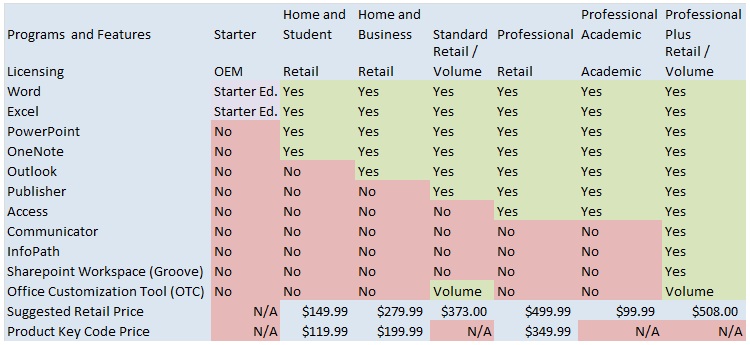
In an attempt to make it easier to visualize the differences between versions, I located a chart from a Wiki article and modified it to include the current suggested retail pricing of the various versions.

Microsoft Office 2010 Features and MSRP Matrix

Microsoft Office 2010 Features and MSRP Matrix

As you can see from the chart, Microsoft Office 2010 Professional Plus offers every feature available in the Office Suite of programs if you purchase the Volume license. And the Home and Student version provides the basic suite of software, excluding the Outlook mail client. The number one seller is Microsoft Home & Business because it does offer Outlook and it is affordable as well.

Notice the “Product Key Code Price” is much lower than the full retail version. The Product Key Code, or PKC version is the same as the Retail offering for each suite with a lower price due to the lack of media. PKC sales are designed for new PC purchases, which come with the evaluation of Microsoft Office 2010 pre-installed. Instead of buying a full retail version and installing that, you purchase the PKC from your vendor, which is just a package that contains a Product Key. The Product Key is then entered into the demo version to register it as the full product you purchased.

Not only does this save on packaging costs, but less packaging means less junk ends up in the landfill (while not a totally green solution, every little bit helps).

Volume licensing is the king of the green solutions as you do not actually receive any paper or packaging, or even media. You purchase a minimum of five licenses, which are delivered electronically, and you download the media and burn it to your own disk. Volume licensing is ideal for a small office of 5 or more, on up to offices and organizations with 1000s of employees.

Homeland Secure IT offers nationwide sales of Microsoft products as full retail, product key code or volume licensing, 1 user or 1 million users. We also offer complete installation, upgrades and computer / network support / service in the Greenville and Upstate South Carolina area. Please call 864-990-4748 ext 201 or email info@homelandsecureit.com for additional information.

1

Secure IT Alert: Microsoft Issues Critical Patches for XP, Vista, Windows 7, Server 2003 & 2008

Secure IT Alert Header

Homeland Secure IT Alert

Homeland Secure IT Alert for Monday, August 02, 2010

Microsoft Issues Emergency Patch: Rated Critical

Microsoft issues out-of-band security bulletin and patch today August 2, 2009. Out of band means released ahead of the regular scheduled monthly update.  The out-of-band patch is designed to address a security flaw in the way shortcuts are displayed.

Software affected includes Windows operating system, various versions, and is rated critical. Microsoft encourages users to take action

This security update is rated Critical for all supported editions of Microsoft Windows listed here and obtained from Microsoft

Operating System
Windows XP Service Pack 3
Windows XP Professional x64 Edition Service Pack 2
Windows Server 2003 Service Pack 2
Windows Server 2003 x64 Edition Service Pack 2
Windows Server 2003 with SP2 for Itanium-based Systems
Windows Vista Service Pack 1 and Windows Vista Service Pack 2
Windows Vista x64 Edition Service Pack 1 and Windows Vista x64 Edition Service Pack 2
Windows Server 2008 for 32-bit Systems and Windows Server 2008 for 32-bit Systems Service Pack 2*
Windows Server 2008 for x64-based Systems and Windows Server 2008 for x64-based Systems Service Pack 2*
Windows Server 2008 for Itanium-based Systems and Windows Server 2008 for Itanium-based Systems Service Pack 2
Windows 7 for 32-bit Systems
Windows 7 for x64-based Systems
Windows Server 2008 R2 for x64-based Systems*
Windows Server 2008 R2 for Itanium-based Systems

Recommendation from Microsoft: Customers who have not enabled automatic updating need to check for updates and install this update manually.

Microsoft Security Advisory

If we can be of assistance with this or any other security or computer issue, please do not hesitate to call us at 864-990-4748 or email info@homelandsecureit.com


Homeland Secure IT Alert Footer

Homeland Secure IT Alert - Contact Info

2

And the winner of our July network security camera giveaway is…

badadadadadadadadadadadaadadad (Simulated drum roll)…

Hal Westmoreland from AccessAbility Services Inc, of Simponsonville, SC was the lucky winner of the wireless network security / surveillance camera giveaway for July! Congratulations to Hal!

Incidentally the first name drawn was Pamela Hoyt, my wife, which somehow didn’t seem fair, so we drew again.

I would like to thank everyone for playing our little game, those who are signed up will be automatically entered into our next contest… Watch for details coming soon!

Wi-Fi connected scale from Withings can rat off your weight to Twitter to encourage you to drop a pound or two

Tanya Thompson / @thompsontanya commented about a device on Twitter this morning that caught my eye… It is the Withings / @Withings Wi-Fi connected scale, which uses network connectivity to log and track your weight loss (or gain) among other things.

You can view your trends with a web interface, and access the data with your iPhone. I believe something like this really could encourage you to lose some weight. Recently there have been news stories which cite studies about weight loss and the results indicate that those who use internet weight tracking actually do lose more weight and manage to maintain that loss better than those who do not.

The thing that bothers me is that it will Tweet out your weight once a week to Twitter. All I could think was exactly what it would be tweeting when I stepped on it… Something like, “HELP ME! This fat guy is smushing me!” is probably what it would have to say about me! Still, it is an interesting gadget and I would love to have it. Who knows, maybe I will order one. Follow me on Twitter to see what this thing has to say!

2

Augen Android 2.1 tablet computer available from K-Mart for $150 – iPad killer?

The Androids are coming, the Androids are coming!

A few posts ago I talked about the number of portable tablet computers / pads that are coming on the market. Yesterday I took Scott’s Android pad to a Greenville meeting spot (Halfway to Habana) where we gather on Thursdays for fun and fellowship – nobody seemed too impressed with the device due to the speed, or lack there of.

While discussing the inexpensive Chinese import (called the iPed) with its 8″ display, wi-fi, etc, Phil Yanov / @thinkhammer brought up the Augen Android pad being offered exclusively by K-Mart. I had not heard of it, but I promptly Googled it to find that the Augen is far superior to the iPed in that it is faster and more responsive and that it is has the Android 2.1 OS loaded on it from the factory. Also, it doesn’t hurt that it is being offered by a reputable franchise (K-Mart) that would allow you to return it should you be disappointed with the performance.

I have checked K-Mart stores around the Upstate and none of them show the device is in inventory, but you can get a rain check to help you be  the first on your block to sport one. Will it be serious competition for the Apple iPad? I don’t think so, not yet. However, the Android pad devices are maturing and as they do so, the sales from all vendors combined are going to (eventually) cut into the Apple market share. (Still waiting on the Palm and Windows Mobile tablets to make their showing)

Here is a first look at the Augen from a new user’s point of view:

If you have one of these devices, I would like to hear from you, so please shoot me an email or respond here!  Have a great weekend!